
Node SDK Reference
Run Tailor tests in your Node.js server with @tailor-ai/node. Needs Node 18 or later.
Set Up
First, create the test in Tailor. Your code uses the names you gave it there, so they must match exactly:
| In Tailor | In your code |
|---|---|
Test key checkout-headline | getTest('checkout-headline', …) |
Value names headline, show_badge | getValue('headline', …) |
Goal key purchase | convert('purchase', …) |
1. Install and add your key
Your SDK key is in Tailor under Settings → Websites & publishing → Server-side testing. Use the production key in production. Only production counts in results.
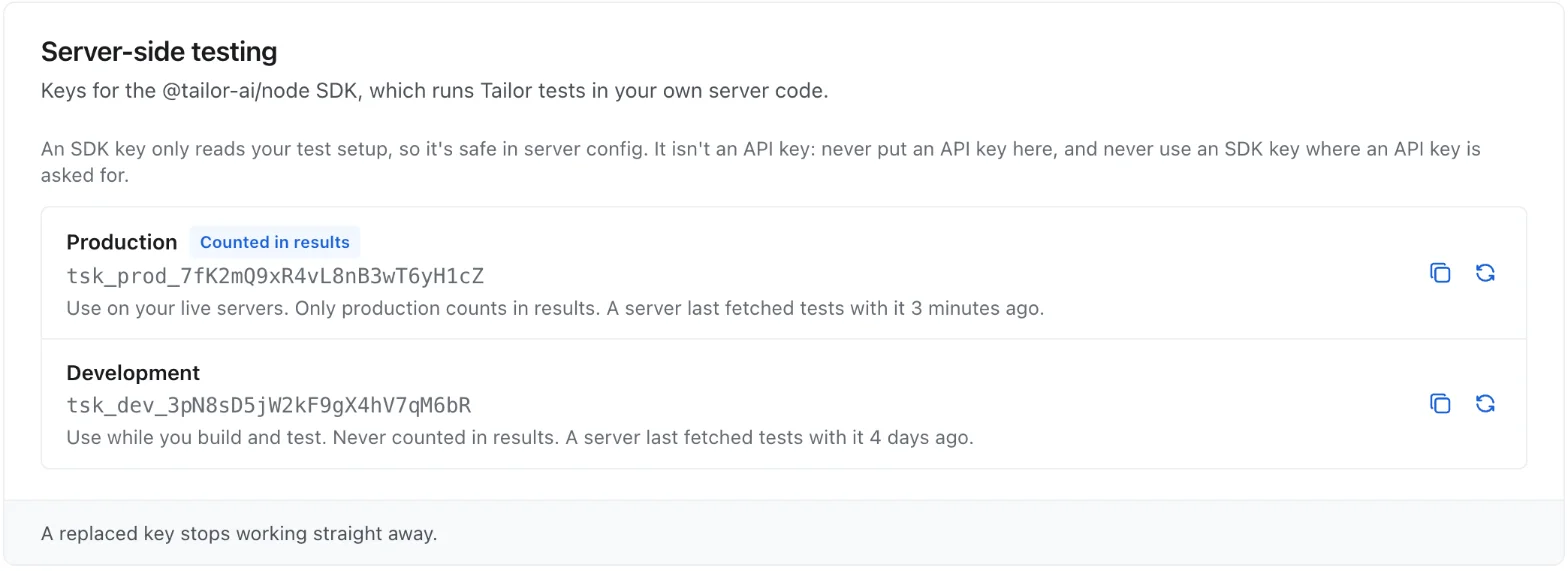
npm install @tailor-ai/nodeTAILOR_SDK_KEY=tsk_prod_...2. Add the server code
Each file does one job: start the SDK, give each visitor an id, show their variant, and record purchases.
import 'server-only'
import { init, type TailorClient } from '@tailor-ai/node'

let client: Promise<TailorClient> | null = null

// One client per server process, started on first use.
export function getTailor() {
  client ??= init({ sdkKey: process.env.TAILOR_SDK_KEY! })
  return client
}import { NextResponse, type NextRequest } from 'next/server'
// Give every visitor an anonymous id, once, and hand it to the page.
export function middleware(request: NextRequest) {
const saved = request.cookies.get('visitor_id')?.value
const id = saved && /^[A-Za-z0-9_-]{1,64}$/.test(saved) ? saved : crypto.randomUUID()
// Your app's own header, so this request's page can read a brand-new id.
// Tailor never reads it; pass the id however your app already does.
const headers = new Headers(request.headers)
headers.set('x-visitor-id', id)
const response = NextResponse.next({ request: { headers } })
if (id !== saved) {
// Not httpOnly: the snippet in the layout reads it.
response.cookies.set('visitor_id', id, {
maxAge: 60 * 60 * 24 * 365, sameSite: 'lax', secure: true, path: '/',
})
}
return response
}
// Every page, so the layout can always give the Tailor tag the id.
export const config = { matcher: ['/((?!api|_next/static|_next/image|favicon.ico).*)'] }import { headers } from 'next/headers'
import { after } from 'next/server'
import { getTailor } from '@/lib/tailor'
export default async function CheckoutPage() {
const visitorId = (await headers()).get('x-visitor-id')!
const tailor = await getTailor()
const test = tailor.getTest('checkout-headline', { id: visitorId })
const headline = test.getValue('headline', 'Complete your order')
const showBadge = test.getValue('show_badge', false)
// Send the visit after the page goes out, before the function freezes.
after(() => tailor.flush())
return (
<>
{showBadge && <span>Free shipping</span>}
<h1>{headline}</h1>
</>
)
}import { getTailor } from '@/lib/tailor'
// Called by your payment provider. Verify its signature first.
export async function POST(request: Request) {
const order = await request.json()
const tailor = await getTailor()
tailor.convert('purchase', {
id: order.metadata.visitorId, // saved on the order at checkout
value: order.total,
currency: 'USD',
orderId: order.id, // counts once, even if sent twice
})
await tailor.flush()
return new Response(null, { status: 200 })
}Needs Next.js 15 or later for after(); on older versions, await tailor.flush() before returning. On Next.js 16, name the file proxy.ts and the function proxy.
At checkout, save the visitor id on the order (for Stripe, in metadata), so the webhook can send it back.
3. Give the Tailor tag the same id, on every page
This is how goals on the page (clicks, form submits, Tailor.convert()) count toward the variant your server chose. Add it once, above your Tailor tag, in the template every page shares. Goals need nothing else: the tag adds this id to each one.
<script>
  window.TailorQueue = window.TailorQueue || []
  window.TailorQueue.push(function () {
    // Must be the same id your server passes to getTest(). This reads the
    // visitor_id cookie from the setup above. Keep your visitor id somewhere else?
    // Read it from there instead.
    var match = document.cookie.match(/(?:^|; )visitor_id=([^;]*)/)
    if (match) window.Tailor.init({ userId: decodeURIComponent(match[1]) })
  })
</script>
<script src="https://app.tailorhq.ai/script/YOUR_ACCOUNT.js" async></script>
In Next.js, that's the root layout:
const TAILOR_INIT = `
  window.TailorQueue = window.TailorQueue || []
  window.TailorQueue.push(function () {
    // Must be the same id your server passes to getTest(). This reads the
    // visitor_id cookie from the setup above. Keep your visitor id somewhere else?
    // Read it from there instead.
    var match = document.cookie.match(/(?:^|; )visitor_id=([^;]*)/)
    if (match) window.Tailor.init({ userId: decodeURIComponent(match[1]) })
  })
`

export default function RootLayout({ children }: { children: React.ReactNode }) {
  return (
    <html lang="en">
      <head>
        <script>{TAILOR_INIT}</script>
        <script src="https://app.tailorhq.ai/script/YOUR_ACCOUNT.js" async />
      </head>
      <body>{children}</body>
    </html>
  )
}- Above the tag, every page. The tag reads the id once, as it starts. If it runs first, or a visitor lands on a page without the snippet, that page's goals won't count for the test.
- Loading the tag through Google Tag Manager? Put the snippet in the page's own HTML, not in a GTM tag, so it runs first.
- Keep the cookie readable. Don't set it
httpOnly, or the snippet can't see the id.
4. Check it works
- Start the test in Tailor.
- Find your own id: the
visitor_idcookie in your browser's dev tools. - In Tailor, add it under Preview visitors for a variant. Reload the page: you see that variant, and your visits aren't counted.
- Results show on the test's dashboard within about 15 minutes.
Reference
What a visitor gets
| When the test is | The visitor gets |
|---|---|
| Running | Their variant |
| Ramped to 100% | The winner |
| Stopped, draft, or not found | Your defaults |
No id? Your defaults. Preview visitors get their chosen variant and aren't counted.
Methods
| Call | What it does |
|---|---|
tailor.getTest(key, { id }) | Gets the visitor's test. Never throws, never waits. |
test.getValue(name, default) | The variant's value, or your default. |
test.getValues() | All values, or an empty object. |
test.variant | { key, name } or null. The original's key is control. |
tailor.convert(goalKey, { id }) | Records a conversion from your server. |
tailor.flush() | Sends waiting events now. |
tailor.status() | Whether settings loaded, their age, and the last error. |
Conversions on the page
Nothing to add. The Tailor tag records clicks, form submits, page visits and Tailor.convert('purchase') calls, and adds the visitor id from setup step 3 to each one. Tailor.convert() on the page takes no id.
Conversions from your server
Use convert for what the page can't see, like a payment confirmed by a webhook.
tailor.convert('purchase', {
  id: visitorId,
  value: 49.99,
  currency: 'USD',
  orderId: 'A123'   // counts once, even if sent twice
})
The goal key is the one in a "From your site's code" goal (see Conversion Goals). A typo isn't caught, so if a goal shows nothing, check the key.
Options for init
| Option | Default | What it does |
|---|---|---|
pollInterval | 5 minutes | How often to check for test changes (ms). |
batchEvents | 100 events / 30 s | When to send events. |
logger | console | Where warnings go. Needs warn and error. |
onTailored | none | Called when a visitor enters a test. |
Before Launch
- Use one id everywhere. The same id on the server, the page and the order. Don't switch to the account id at login, or the purchase won't count.
- Call
getTestonly where you use the value. The first call counts the visitor. - Don't share cached pages. Never serve one visitor's variant to another. Render per request, or cache per
test.variant?.key. - Serverless?
await tailor.flush()before returning, or events can be lost. - The SDK key isn't secret. It only reads your running tests. Never use an API key in its place.
- Use an anonymous id. Not an email or name. The SDK only sends a hash of it.
- If Tailor is unreachable, the SDK keeps the last settings it had. Before the first load, everyone gets your defaults.
From VWO or Convert
Mostly renames. In Tailor, create a server-side test with the same key, and add the variables as values.
VWO
| VWO | Tailor |
|---|---|
init({ accountId, sdkKey }) | init({ sdkKey }) |
client.getFlag(key, { id }) | tailor.getTest(key, { id }) |
flag.isEnabled() | test.isTailored() |
flag.getVariable(name, default) | test.getValue(name, default) |
client.trackEvent(…) | tailor.convert(goalKey, { id, value }) |
client.flushEvents() | tailor.flush() |
storage, customVariables | Remove (no targeting yet) |
Convert
| Convert | Tailor |
|---|---|
new ConvertSDK({ sdkKey }) | init({ sdkKey }) |
sdk.createContext(id) | Pass { id } on each call |
ctx.runFeature(key).variables | tailor.getTest(key, { id }).getValues() |
ctx.trackConversion(…) | tailor.convert(goalKey, { id, value }) |
sdk.releaseQueues() | tailor.flush() |
dataStore, segments | Remove (no targeting yet) |
No visitor storage needed: a running test can't change its split, so every server gives a visitor the same variant.