
AI Landing Page Personalization
Match paid traffic to the right message.
Without rebuilding pages or waiting on dev. Tailor personalizes your existing pages by campaign, audience, and context.
Last updated September 2026
 Tailor AI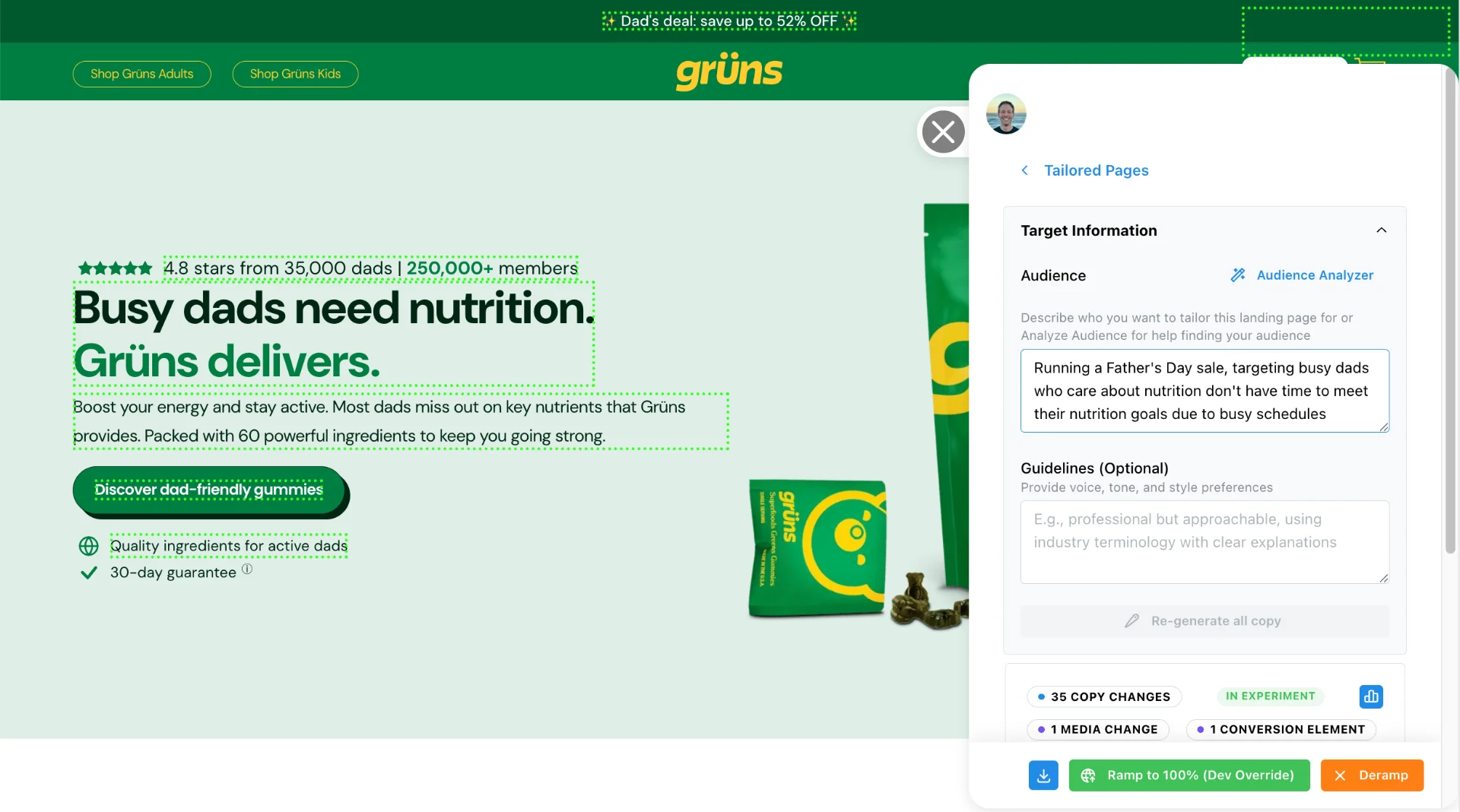
Teams running Tailor






The problem
The problem isn't your traffic. It's mismatch.
You’re already paying for intent. The leak happens after the click.
- Ads are specific, landing pages are generic
- Audiences vary, messaging doesn't
- Teams want to iterate, but shipping is the bottleneck
Personalization closes the gap between traffic intent and on-page relevance.

A B2C subscription brand increased paid conversion rate by 42% using Tailor. Read the case study →
Conversion fundamentals
What makes high converting landing pages
Personalization only pays off if the fundamentals underneath it are sound. Across paid acquisition, the same four factors separate pages that convert from pages that leak spend.
- Message match with the ad
- The page should repeat the promise the visitor clicked. If the ad sells a specific outcome to a specific audience and the page opens with a generic product line, visitors bounce before reading further. Message match is the highest-return fix on most paid pages.
- One clear call to action
- Every additional CTA splits intent. Give the visitor one primary next step (start a trial, book a demo) and demote everything else. A page that asks for a demo, a trial, a newsletter signup, and a webinar registration converts to none of them well.
- Proof near the decision
- Case study numbers, customer logos, and security badges work when they sit next to the form or CTA, at the moment of hesitation. Proof buried three scrolls above the decision point does almost nothing.
- Relevance per segment
- A visitor from a competitor comparison keyword needs different proof than a visitor from a brand search. A mobile visitor from a Meta ad scans differently than a desktop visitor from LinkedIn. One static page can't be maximally relevant to all of them at once.
That last factor is where a static page hits its ceiling, and where personalization changes the math on landing page performance. A single fixed page is tuned for the average visitor, and the average visitor is a statistical fiction. Your traffic is really a mix of segments with different intent, different objections, and different vocabulary. Personalizing the message per segment means each audience gets its best-converting version, so conversion improves segment by segment instead of chasing one site-wide average that undersells every audience a little.
None of this requires more traffic or a bigger budget. Visitors already arrive with their intent encoded in the click: the campaign that brought them, the keyword they searched, the device they’re on. The page just has to use it.
Message continuity
Ad-to-page match, without maintaining it by hand
Message match is a per-campaign job, and doing it manually doesn’t scale past a handful of campaigns. Tailor automates the continuity: the ad copy behind each Google or LinkedIn campaign carries into the page headline, so the visitor sees the promise they clicked restated in the first second on the page. When the ads team changes creative, the page follows without a ticket.
“I just don’t have the time, or like the tool, I guess, to do that automatically.”
This matters because paid accounts aren’t static. A working account has dozens of active ad groups, each implying a slightly different page, and creative refreshes land every few weeks. Maintaining a manual variant per ad group is exactly the kind of work that quietly stops happening in week three. Automated ad-to-page matching keeps the match rate high while your attention goes to the tests that need actual judgment.
The mechanics are covered step by step in the Ad-to-Page Playbook →
The mechanism
How AI Landing Page Personalization Works
Signals come in. Content adapts. Outcomes are measured. No page rebuilds needed.
1.Detect context
- UTMs and referrer
- Device and geo
- Ad platform source
- Company identification: know which accounts are on your site
2.Create variants fast
- Edit existing page elements visually
- Publish without rebuilding
- Target by audience + campaign
- AI-assisted copy drafting
3.Measure impact
- Built-in A/B experiments
- Per-audience analytics
- Downstream metric tracking
- Integrate with your stack
One-time lightweight install, then marketers run it self-serve. Watch the copy customization demo.
Tools landscape
AI landing page personalization vs AI landing page builders
Search for AI tools in this category and you will find two product types that sound similar and do very different jobs. An AI landing page generator (often called an AI landing page builder, the terms are used interchangeably) creates new pages from scratch. You describe the offer, it produces a page, and the result is hosted on the vendor’s infrastructure or exported into your stack. Tools like these are genuinely useful when you have no page at all and need one by Friday.
Tailor is the other type. It doesn’t build pages. It personalizes the landing pages you already have, whether they were built in Webflow, WordPress, Framer, or a custom React app. Your designers keep their design system, your developers keep their stack, and Tailor adapts what each visitor sees on top of the page that already exists.
The distinction matters more than it first appears, because generating new pages has costs that only show up later:
“Some marketers will just not clone them, because they can’t manage 200 landing pages. And so they’re not getting optimal conversions, because the messages don’t resonate from paid ad to landing destination.”
- New URLs start from zero
- A generated page has no backlinks, no ranking history, and no internal links pointing at it. Your existing pages carry SEO equity that took years to build. New pages compete with that equity instead of compounding it.
- Brand drift
- Template output rarely matches your design system exactly. Ten generated pages means ten slightly different versions of your brand in market, each one a little off in type, spacing, or tone.
- Analytics fragmentation
- Every new page needs tags, events, and conversion goals wired up again. Variants of an existing page inherit the measurement that's already in place, so reporting stays comparable across tests.
- Maintenance multiplies
- When pricing or positioning changes, every generated page is one more thing to update. A personalized base page is still one page, however many segments it serves.
None of this makes an AI landing page builder the wrong choice everywhere. If you are launching a campaign with no destination page, or spinning up a microsite outside your main domain, generating a page is faster than briefing a designer. The question is what happens to the pages that already carry your paid traffic. For those, replacing them resets everything that works. Personalizing them keeps the foundation and changes only the message.
We wrote a detailed comparison of the two approaches, including where builders genuinely win: Tailor vs AI page builders →
Ready to see it in action?
Read the buyer guide → or compare vs Optimizely / VWO / Mutiny →
Workflow
How to create personalized landing pages without rebuilding
Here is the working loop, end to end. Setup is a one-time script install (a GTM tag or one line of JS), and everything after that’s marketer self-serve.
- 1
Connect your signals
Tailor reads context automatically. UTM parameters and ad platform identifiers give you campaign and keyword, the referrer gives you source, and the request gives you device and geography. For B2B traffic, company enrichment adds IP-based identification of the company, industry, and size behind anonymous visits, so an enterprise fintech visitor can be treated differently from a solo founder.
- 2
Edit the page in place
Open your live page with the Tailor extension and edit it directly. Click the headline and rewrite it, swap the hero image, change the CTA label. AI drafts variant copy from your ad and page context when you want a starting point. The original page stays untouched for everyone outside the target segment, and nothing about your CMS or deploy process changes.
- 3
Target each variant to a segment
Attach rules to the variant: a UTM campaign matches, a keyword theme applies, the industry is fintech, the device is mobile. This is how one base page serves many audiences. The same URL shows your default message to organic traffic, campaign-matched messaging to paid clicks, and account-specific proof to target companies.
- 4
Launch it as an experiment
Every variant can run as a controlled test against the original, with per-segment analytics on the metric you actually care about: trial starts, demo requests, qualified signups. Because targeting and testing share the same system, you learn which message wins for which audience, not just which page wins on average.
- 5
Let the loop propose the next test
This is the part that compounds. Tailor watches per-segment performance and proposes the next test: a segment that underperforms its ad promise, a winning variant worth extending to a similar audience, a drop worth investigating. You approve, it launches and learns. Over time the test backlog comes to you instead of from brainstorm meetings.
That’s the full workflow, built on the pages you already run. Notice what’s missing: you never generate personalized landing pages as new URLs. Every variant ships on the URL your ads already point to, which keeps attribution clean, avoids duplicate-content problems, and means your ad platform never has to re-learn a new destination.
For a week-by-week rollout plan, see the Personalization Playbook →
Where to start
Where personalization pays off first
Not every page and channel benefits equally. Start where the click tells you the most about what the visitor wants.
- Google Ads search
- Search traffic tells you exactly what the visitor wants: the keyword. Mirror the keyword theme in the headline and the supporting proof. A visitor searching for a competitor alternative should land on a page that talks about switching, not a page that introduces the category from zero. This is usually the highest-ROI place to start because intent is explicit and spend is concentrated.
- Paid social (LinkedIn, Meta)
- Social traffic carries audience intent rather than keyword intent. The ad promised something to a specific persona, so the page should keep that promise in the same language: the same pain point, the same example, proof from companies that look like theirs. Campaign and ad set parameters give you the targeting handle.
- ABM and B2B enrichment
- With company identification, a visit from a target account can get account-relevant proof: industry-specific examples, logos from their peer group, a CTA that routes to the right sales motion. This is where knowing who is visiting turns into revenue rather than just a dashboard stat.
- Returning visitors
- Someone on their third visit doesn't need the intro pitch again. Show them what's new, address the likely objection, or lead with the CTA they hovered over last time. First-time vs. returning is the simplest segment split available and it costs nothing to try.
Step-by-step channel guides: Google Ads keyword matching → and B2B personalization with enrichment →
Outcomes
Measure on signups and revenue
Personalization without downstream measurement is guesswork. Tailor connects to the metrics that drive budget decisions.
B2C Subscription
- Trial starts
- and free-to-paid conversion
- Subscription volume
- by audience segment
- CAC and ROAS
- by campaign variant
- Payback period
- on personalization tests
B2B PLG
- Sign-up to activation
- rate by variant
- PQL volume
- by audience segment
- Pipeline created
- from personalized pages
- Variant performance
- tied to CRM outcomes
Measurement
Measuring landing page performance beyond clicks
Click-through and on-page interaction are the easiest metrics to move and the least meaningful to report. A variant that lifts CTA clicks but doesn’t move trial starts is a wash, and a variant that attracts more clicks from the wrong segment can quietly make CAC worse while the dashboard looks green.
Landing page performance is better read as a hierarchy: clicks, then signups or leads, then activation or qualified pipeline, then revenue. Measure at the deepest level where you have enough volume to detect a difference, and treat everything above it as a diagnostic, not a result.
Personalization raises the stakes on this. Because variants win or lose per segment, a blended number can hide a real divergence. The mobile variant might lift clicks while the enterprise variant lifts pipeline, and a single average tells you neither. Tailor tracks each variant per segment through your existing stack (GA4, Amplitude, Mixpanel, Segment), so downstream outcomes attach to the segment and variant that produced them, through to CRM outcomes for teams with that connection.
This is also what makes reporting defensible. A statement like “the fintech segment converts to demo at twice the account average since the proof swap” survives scrutiny in a budget meeting. “Engagement is up” doesn’t. When variant results are expressed in revenue terms, the program stops being a design experiment and starts being a line item that defends itself.
The other half of measurement is knowing when something breaks. Conversion rarely fails loudly. It drifts: a checkout change, a new competitor ad, a shifted traffic mix, and CAC creeps up before anyone notices. Tailor monitors per-segment performance and flags drops early, so you catch the drift before the monthly report does.
For the full methodology, read the guide to measuring landing page impact through to pipeline → and see how Performance Insights turns those metrics into a prioritized list of what to fix next.
What goes wrong
Common mistakes when personalizing pages
Most personalization programs that stall do so for process reasons, not tooling reasons. These are the patterns worth avoiding from day one.
- 1
Personalizing before fixing message match
If your best-funded campaign lands on a page that ignores the ad's promise, fix that first. It's the cheapest win available and it doesn't require segmentation at all. Personalization then extends the fix to more segments instead of papering over a broken default.
- 2
Over-segmenting on day one
Twelve segments with a trickle of traffic each means twelve experiments that never resolve. Start with the two or three segments that carry most of your spend, prove lift there, and only then split further. Segments should earn their existence with volume.
- 3
Rewriting the whole page
Most of the lift comes from a few elements: the headline, the subhead, the proof block, and the CTA. Changing forty things at once makes results impossible to interpret and variants expensive to maintain. Treat each element as a variable and change the ones that carry the message.
- 4
Judging variants on clicks
A variant that wins on clicks and loses on trials is a loss. Wire experiments to the deepest metric you can measure at reasonable volume before you launch, not after. Otherwise the program optimizes toward engagement instead of revenue.
- 5
Set-and-forget variants
Campaigns change, keywords shift, competitors reposition. A variant that matched its ad in March can be mismatched by June. Review targeting when campaigns change, and let anomaly alerts catch the drift you would otherwise find in the quarterly review.
Testing
Personalization and A/B testing aren't opposites.
A/B testing proves lift. Personalization prevents averaging. The teams that win use both.
| Dimension | A/B testing only | Personalization + experiments |
|---|---|---|
| Who sees what | Same variants shown to all visitors | Right variant matched to each audience |
| What you optimize for | The average visitor | Each segment independently |
| Traffic requirements | Large volume for significance | Personalize from day one; test with available traffic |
| Iteration speed | Limited by test cycle length | Ship variants without dev; test continuously |
| Insight depth | Which version won overall | Which version won for which audience, and why |
Who sees what
- A/B testing only
- Same variants shown to all visitors
- Personalization + experiments
- Right variant matched to each audience
What you optimize for
- A/B testing only
- The average visitor
- Personalization + experiments
- Each segment independently
Traffic requirements
- A/B testing only
- Large volume for significance
- Personalization + experiments
- Personalize from day one; test with available traffic
Iteration speed
- A/B testing only
- Limited by test cycle length
- Personalization + experiments
- Ship variants without dev; test continuously
Insight depth
- A/B testing only
- Which version won overall
- Personalization + experiments
- Which version won for which audience, and why
Most teams need both. See how A/B testing works inside Tailor →
Fit
Built for ad-driven teams
Most personalization tools were built for ecommerce. Tailor was built for growth and marketing teams.
- Match landing message to ad promise by campaign
- Tailor proof and CTA by audience segment
- Ship experiments fast when CAC spikes
- See which companies visit, personalize for target accounts
- Detect performance shifts before CAC quietly creeps up
- Iterate at marketer speed, not sprint speed
See how Tailor compares to Optimizely, VWO, Mutiny, and more →
Explore the full targeting guide
Honest scoping
When personalization isn't the right tool
A few situations call for something else first. If you have no page at all, start with an AI landing page builder or your design team, then personalize once the base page exists. There’s nothing to adapt until something is live.
If all of your traffic is genuinely one audience with one intent, a single well-tested page may be all you need. Segmentation earns its keep when your traffic is a real mix: multiple campaigns, keywords with different intent, or accounts of very different sizes.
And if the offer itself is the problem (pricing that doesn’t fit the market, a product promise the product doesn’t keep), no headline will fix it. Personalization amplifies an offer that works for at least one segment. It can’t rescue one that works for none.
Everything else, which for most teams running paid traffic is the majority of pages, benefits from matching the message to the visitor.
Why Tailor
Why teams choose Tailor
If your bottleneck is shipping, not ideation, Tailor is built for that.
- Identify which accounts visit, personalize before they leave
- Ship variants in minutes, not sprint cycles
- Targeting by UTM, geo, referrer, device, or company
- Built-in A/B testing with per-audience analytics
- Integrations into GA4, Amplitude, Mixpanel, Segment
- Detect performance drops. Know what to test next.
FAQ
Frequently asked questions
AI landing page personalization dynamically adapts page content (headlines, copy, images, and CTAs) to match each visitor's context using signals like UTM parameters, referrer, device, geo, and optional company-level enrichment. Instead of showing all paid traffic the same generic page, each visitor sees messaging matched to their intent.
An AI landing page builder generates new pages from a prompt, usually hosted on the vendor's infrastructure or exported as templates. Tailor works on the pages you already have. It adapts headlines, copy, images, and CTAs on your existing URLs per audience, so your brand system, SEO equity, and analytics setup stay intact. If you have no page yet, a builder gets you a starting point. If you already have pages that convert, personalizing them compounds what works instead of replacing it.
Yes. Tailor sits on top of whatever renders your pages: Webflow, WordPress, Framer, a landing page builder, or a custom React app. Nothing about your publishing workflow changes. You keep designing and shipping pages the way you do today, and Tailor personalizes them per segment after they're live.
Yes, when the root cause of low conversion is message mismatch. If your ads are specific but your landing page is generic, personalization closes that gap. Teams typically see meaningful lifts on trial starts, sign-ups, and form conversions, though the magnitude depends on how large the mismatch was to begin with.
For personalization (showing the right content to the right audience), no. You can personalize from day one regardless of traffic volume. For A/B testing within those personalized experiences, traffic requirements depend on the effect size you're trying to detect. Segmented personalization doesn't require statistical significance the way a formal experiment does. If you have under 5,000 sessions/month per page, shipping better-matched variants still beats averaging.
No, when implemented correctly. Search engines see the original page structure unchanged: Googlebot gets the default version, your canonical URL stays clean, and the script loads asynchronously so it doesn't affect your Lighthouse score. Tailor doesn't create separate URLs for personalized variants. The SEO risk in this space is cloaking (intentionally showing Googlebot different content than users to manipulate rankings). That's a policy violation. Audience-based personalization tied to UTMs and visitor context isn't cloaking.
There's no fixed cap. One base page can serve a distinct variant per campaign, keyword theme, audience, geo, device, or identified company segment. The practical limit is how many segments you can meaningfully differentiate and measure. A sensible starting point is a handful of segments per page (for example, your top campaigns plus a mobile variant), expanding as results come in. Each variant lives on the same URL, so you aren't maintaining dozens of separate pages.
Campaign and keyword (via UTM parameters and ad platform identifiers), traffic source and referrer, device, geography, new vs. returning visitors, and company-level enrichment: IP-based identification of company, industry, and size for B2B traffic. Signals can be combined, for example a LinkedIn campaign plus an enterprise-sized company. The targeting guide covers the full list.
Only for the initial install, a GTM tag or a one-line script. After that, marketers run the workflow self-serve using a browser extension: edit page elements visually, set targeting rules, publish. No dev tickets required for shipping new variants. Engineering is only needed if you want custom integrations or API-level data passing.
No. Tailor isn't an AI landing page generator. It doesn't produce new pages or new URLs; it adapts the pages you already have. AI assists inside that workflow, drafting variant copy from your ad and page context and proposing the next test to run, but every change ships to your existing URL and you approve what goes live.
Dynamic text replacement swaps a keyword into a headline slot. It helps, but it's a small subset of what matters. Personalization adapts the full message per segment (headline, subhead, proof, imagery, CTA), targets on more than the keyword (audience, device, geo, company), and measures each variant against downstream outcomes. DTR is one tactic inside that larger loop.
Setup takes under 10 minutes (a GTM tag or one-line script). After that, a first variant is typically a same-day exercise: open the page in the extension, edit the headline and proof for your top campaign, set the targeting rule, publish. Nothing needs to go through a release cycle.
Tailor integrates with your existing analytics stack (GA4, Amplitude, Mixpanel, Segment) so you can tie personalized variants to the downstream metrics that matter: trial starts, activations, revenue, pipeline. You're not limited to on-page click metrics. For teams with CRM or data warehouse connections, outcomes can be tracked through to closed revenue.
Three jobs, all with you in the approval seat. It drafts variant copy from your ad and page context so you start from a relevant draft instead of a blank field. It proposes the next test based on per-segment performance and intent signals, so the backlog builds itself. And it watches for performance drops and shifts, flagging them before they show up in CAC. It doesn't publish anything you haven't approved.
Tailor is designed to minimize performance impact. The script is lightweight, and personalization is applied after the page loads to avoid blocking render. We don't introduce flicker on page load for standard use cases. For teams with strict performance budgets (Core Web Vitals, PageSpeed scores), verify implementation details with us. Performance requirements vary by site.
More depth on tools and tradeoffs: Best AI Landing Page Personalization Tools →
Concerned about SEO and cloaking? Read our SEO safety guide.
Turn paid clicks into signups and pipeline.
Stop sending high-intent visitors to generic pages.