
Feature
A/B Testing and Analytics
The A/B testing tool built into Tailor's automatic site personalization. Launch and measure targeted page changes per audience segment, and see which page experiences improve conversion, pipeline, revenue, and downstream outcomes.
 Tailor AI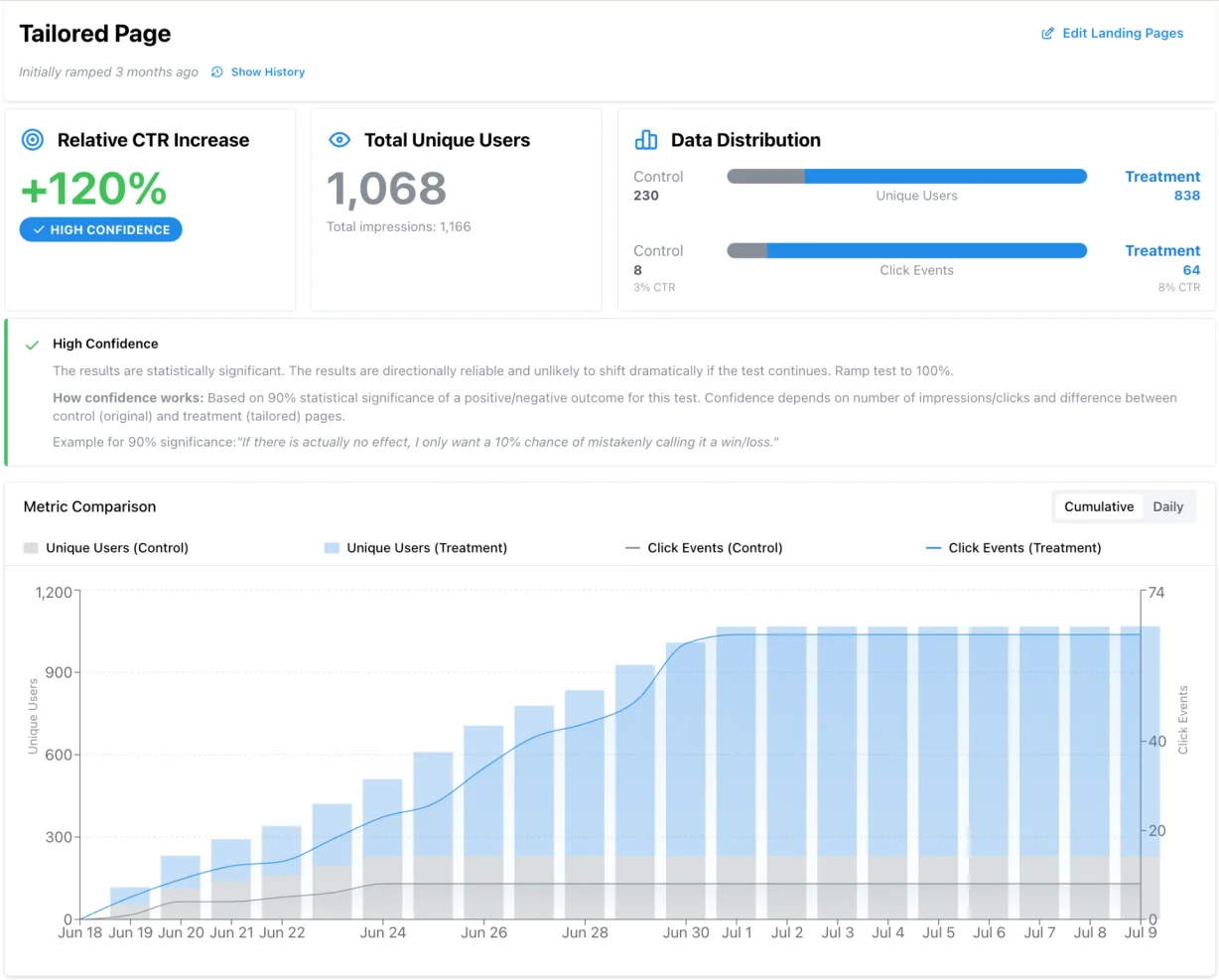
Teams running Tailor






What it does
- Per-segment A/B/C testing
- Test variants per campaign, keyword, or audience segment. See which message wins for which traffic, not just overall.
- Full-funnel measurement
- Track click distribution, scroll depth, dwell time, and downstream goals like signups, pipeline, and revenue.
- Alerts and anomaly detection
- Get notified when conversion drops, traffic spikes, or a campaign goes dark. Catch problems before spend spikes.
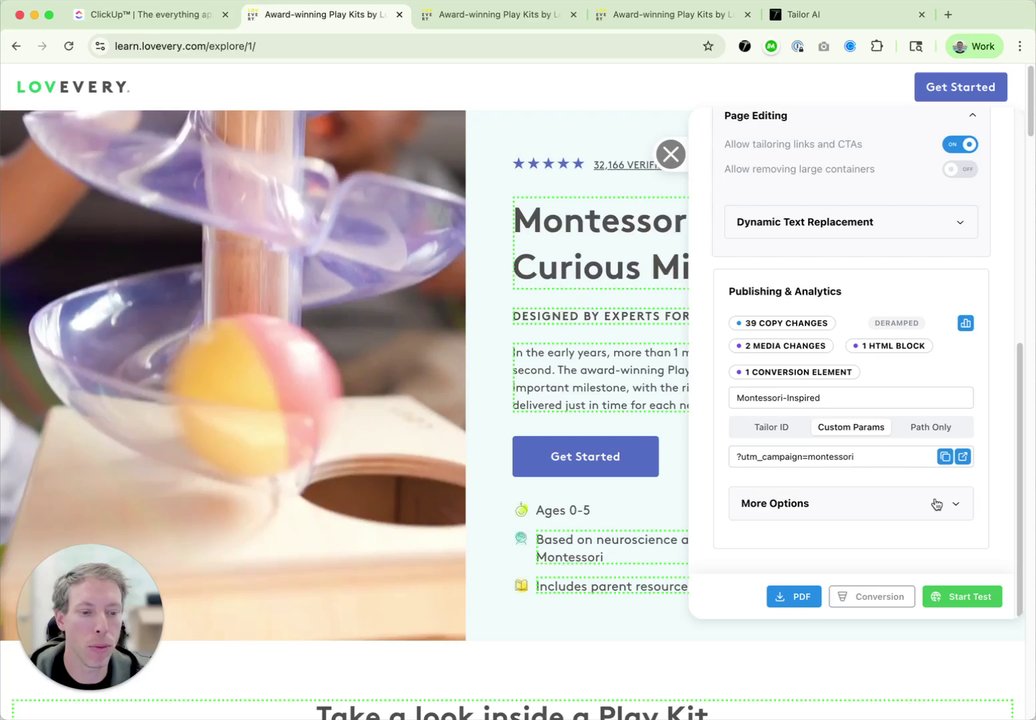
See automatic A/B testing in action
Tailor splits traffic automatically the moment you publish a variant. No setup, no dev tickets.
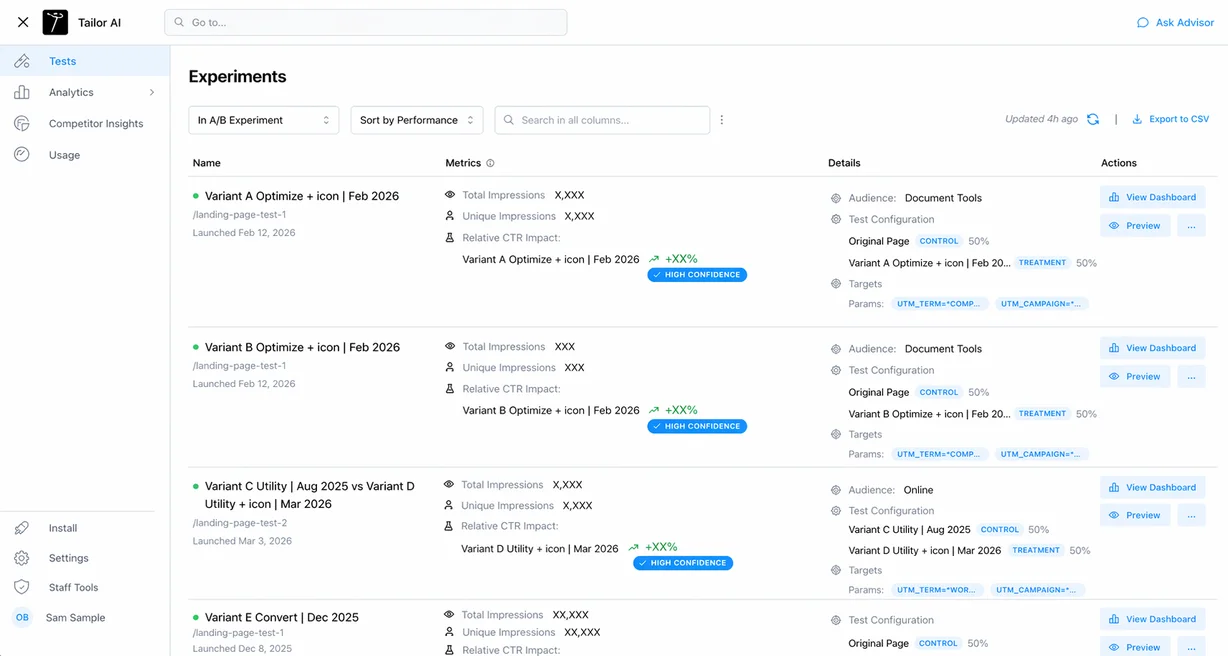
Every experiment in one place
See all your tests at a glance with per-variant CTR deltas, winner detection, and segment-level detail.
Know what works. Instantly.
Most teams bolt analytics onto their testing setup with a spreadsheet and a prayer. Here the measurement is the same system that runs the test, so every variant comes with its own behavioral data and downstream conversions from day one. No tagging project, no waiting on a data team to build the report.
- Click distribution, scroll depth, and dwell time per variant.
- Downstream goals: signups, pipeline, revenue. Not just clicks.
- Campaign-level breakdowns with automatic alerts when something shifts.
- Alerts when a test hits a clear winner or stalls from low traffic. View in the web app or push to Slack.
What makes a good A/B testing tool
A/B testing is one piece of conversion rate optimization, and the tool you pick decides how fast that loop runs. Most A/B testing software was built for a world where an analyst designed every test and a dev team shipped it.
That older generation assumed one page, one test, one winner for everyone. It made sense when traffic was mostly uniform. It breaks when you’re pointing dozens of campaigns, hundreds of keywords, and several channels at the same handful of pages, because each of those audiences behaves differently and a single winner flattens all of it. Here’s the checklist we’d use to evaluate any A/B testing tool today, ours included. One caveat before you read it: testing isn’t Tailor’s core. Tailor is automatic site personalization, and testing is how every change it makes proves itself.
- Per-segment results, not site-wide averages
- A variant that wins overall might be winning big with paid search and losing with retargeting. A good A/B testing tool shows you the winner per campaign, keyword, source, device, and geography, so you ship the right variant to each audience instead of averaging away the lift. Site-wide averages are how teams ship a change that helps one audience and quietly hurts another.
- Tests proposed for you, launched on approval
- Automatic A/B testing means the backlog writes itself. Tailor watches how each segment behaves, proposes the next test with the reasoning attached, and launches it the moment you approve. You keep judgment and brand control. The tool handles the labor.
- Results tied to revenue, not clicks
- A test that lifts clicks but attracts worse leads is a loss dressed as a win. Every variant should be tied to trials, conversions, pipeline, and revenue, so the winner is the one that makes you money, not the one that gets tapped more often.
- No performance tax
- The script loads async after page render and is designed to leave your Lighthouse score alone. Search engines see the original page structure unchanged, so testing never puts your SEO at risk. That's a hard requirement for paid landing pages, where page speed feeds Quality Score and cost per click.
- No dev queue
- If every test needs a ticket, you'll run a dozen tests a year. Marketing teams routinely describe 2-4 week cycles to get a single variant live through the normal brief, design, build, QA, deploy process, while ad platforms iterate creative daily. Launch variants on live pages directly from your browser instead. No sprint, no deploy, no waiting on engineering to free up.
Comparing options? We wrote up the honest landscape, including where the classic platforms still make sense and where they tend to stall, in our guide to the best conversion rate optimization tools.
Coming soon
Smart AI optimization
Tailor surfaces your next best test based on segment performance and intent signals, so your experiment backlog is always prioritized by expected impact, not random ideas.
“I want to set a rule: when you're high confidence, go to the next test... most people don't have the sample sizes or the patience. That was always a painful part.”
Our answer: experiment alerts flag clear winners and high-confidence losers automatically, ramping a winner is one click, and rule-based winner rollout is on the public roadmap. You set the rule; Tailor does the watching.
FAQ
Frequently asked questions
An A/B testing tool splits your traffic between two or more versions of a page, measures how each version converts, and tells you which one wins. Good ones handle the statistics for you. Tailor goes further: it also proposes what to test next based on how each segment behaves, so you're never starting from a blank backlog. If you're evaluating the category for the first time, start with the segments you already buy traffic for. The tool should tell you what wins for each of them, not just what wins on average.
Honestly, Tailor isn't an A/B testing tool at its core. It's automatic site personalization and optimization: the AI researches your traffic, personalizes pages per segment, proposes tests, and launches them on your approval. A/B testing is built in because it's how every change proves itself. So where most A/B testing software finds one winner for all your traffic, Tailor finds the right experience per segment (campaign, keyword, source, device, geography, enriched company data) and ties results to trials and revenue instead of stopping at clicks. It runs from one async script on your existing pages, so you can try it next to whatever you use today.
Less than you’d think. Classical testing at high confidence needs around a thousand conversions per variant, but Bayesian methods, bigger changes, and automatic traffic allocation work well below that. Our traffic thresholds guide covers the exact cutoffs and when to automate instead of experiment.
Yes, that's the core of it. Run a test only for a specific campaign, keyword, source, device, or geography, or for enriched attributes like industry and company size. Each segment gets its own baseline and its own winner, so a headline that wins for paid search isn't forced on your retargeting traffic.
No. The script loads async after page render and is designed to minimize impact on your Lighthouse score. Search engines see your original page structure unchanged, so testing doesn't touch your SEO.
Every variant is tracked past the click: trials, signups, pipeline, and revenue, depending on what you’ve connected. That catches the classic failure where a variant lifts clicks but attracts worse leads. For longer B2B cycles, variant labels can follow the lead all the way to your CRM, so a test launched this quarter gets judged on the pipeline it sources next quarter. The full method is in our measure to pipeline guide.
Most A/B tests can be set up in under 5 minutes using our visual editor. No coding or developer involvement required.
We use industry-standard statistical methods with a 90% confidence interval. Tests automatically notify you when results reach statistical significance.
Our integrations automatically send test data to your existing analytics platforms. Set up once, and all future tests sync automatically with proper event tracking.
Loads async after page render. Designed to minimize impact on your Lighthouse score and preserve SEO. Search engines see your original page.
Ready to see your lift?
Start testing in minutes. See what works per segment and surface what to test next.
Book a demoPropertyGuru raised click-through 69% on its guide pages by changing what sits above the fold.
Read the PropertyGuru case study