
Use case · B2B enrichment
Target accounts are clicking your ads and landing on the generic page.
Use available company enrichment to adapt page content for visiting accounts.
Last updated March 1, 2026
 Tailor AI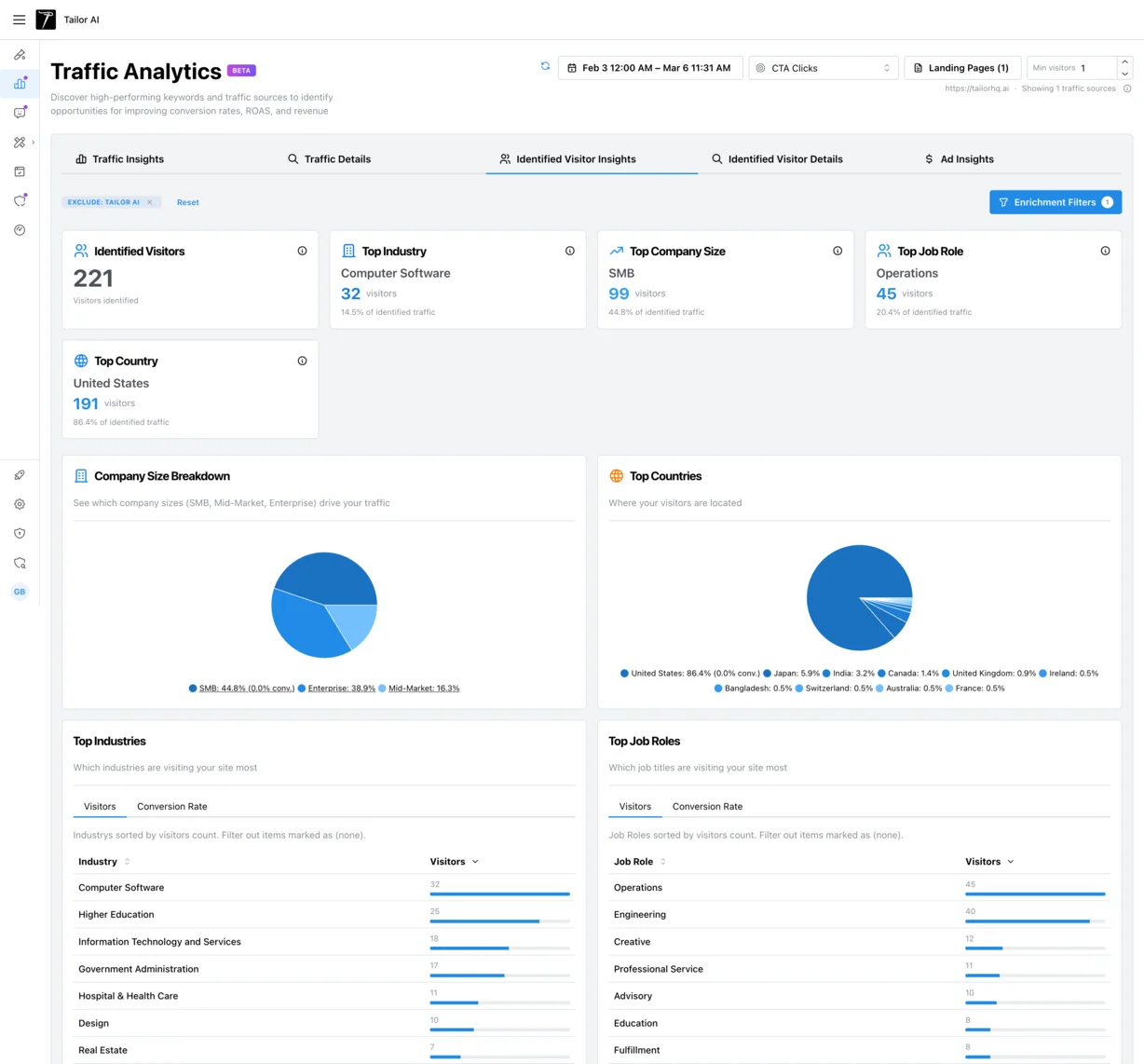
- Built from
- Hundreds of conversations with B2B marketing and sales teams.
- Covers
- Enrichment use cases, match rate realities, privacy considerations, and practical implementation patterns.
Teams running Tailor






The problem
Show target accounts page content relevant to their campaign and company.
Use company enrichment to test content relevant to visitors from target accounts.
Many B2B teams told us they know they should be doing this but are not. As one team put it:
"The website deanonymization, we don't do it. We just don't. Well, we should. I want to."
"Did you know that 40% of your traffic is coming from automotive companies, but your landing page says nothing about automotive services even though that's something you offer?"
"If I can in an easy way say, oh yeah, we're targeting these 10 companies, these five are active on our website, that's very valuable."
How it works
Three layers: identify, adapt, measure
You can also let Tailor’s agent find the test, build the variant, and launch it. You approve before anything ships.
- 1
Identify
IP-based lookup identifies the visiting company, industry, employee count, and sometimes headquarters location. This happens automatically for each visitor. No cookies, no forms required. Tailor doesn't require or collect personally identifiable information by default. Company-level identification only.
- 2
Adapt
Tailor uses this data to show relevant messaging. Show a fintech case study to fintech visitors. Show enterprise pricing to enterprise-size companies. Show industry-specific proof points to each vertical. The page adapts without any manual segmentation setup per visitor.
- 3
Measure
Per-segment experiment results tied to pipeline and revenue. Compare personalized vs. default experiences for identified traffic, and track the impact through to downstream conversions.
For a deeper look at how identification works, see the visitor identification docs. To configure which segments to target, see the targeting guide.
Patterns
Real patterns from conversations with B2B teams
These are the most common ways teams use enrichment data. They range from passive visibility to active page personalization.
- Passive enrichment: just see who is visiting
- No page changes. Sales gets Slack alerts when target accounts visit. Marketing sees which industries and company sizes make up their traffic. This alone changes how teams prioritize outreach.“People just like to know data. It’s really exciting to see 100 people in the last week came in and they were our target audience.”
- Active personalization: adapt the page
- Show industry-specific case studies, messaging, and proof points based on the identified company. One team mapped 6 target accounts across 4 personas, producing 24 page variations. Others start simpler: swap a headline and a testimonial per industry vertical.
- Sales intelligence: surface visit patterns to sellers
- When multiple people from the same company visit, that’s a buying signal. Teams told us they want this surfaced proactively.“If 20 people from the same company visit over two weeks in similar roles, I want that surfaced to my sellers.”
- CRO segmentation: enterprise vs. SMB messaging
- Different company sizes need different CTAs, pricing frames, and proof points. Enrichment makes this segmentation automatic instead of manual. CRO managers can run segmented experiments independently, without relying on the performance marketing team for audience data.“Enrichment allows him to use the tool by himself. Previously he didn’t know what to tailor for.”
To measure enrichment-based experiments against pipeline and revenue, see conversion goals.
See enrichment-based personalization on your site
Limitations
What enrichment can't do (and what to expect)
Enrichment is valuable, but it isn’t magic. Being honest about the constraints helps you plan around them.
- Match rates are typically 25-50%, not 90%+
- Most enrichment providers identify 25-50% of traffic at the company level. The rest of your visitors remain unidentified, and you should have a strong default experience for them. Match rates are highest for mid-market and enterprise traffic from commercial IP addresses. Remote workers on residential IPs are harder to match.
- Enrichment costs add up at scale
- IP-to-company lookups typically cost $0.04-0.10 per call. High-traffic sites can accumulate meaningful cost. Sampling strategies (enriching only a subset of traffic, or only traffic to high-value pages) help manage this.
- Consent-gated by design
- When integrated with a cookie-banner solution, Tailor runs enrichment only after the visitor gives consent. Contact-level deanonymization isn't part of Tailor's enrichment. Confirm with your legal team for your specific data processing requirements.
- The provider landscape is consolidating
- Legacy enrichment providers are being acquired or shut down. This creates both risk and opportunity. Choosing a provider with a clear roadmap matters more than it used to.
- Even imperfect data is valuable
- The alternative to 30-50% match rates is zero visibility into who is visiting your site. Teams consistently told us that partial identification is still dramatically better than none.
Privacy
Privacy considerations
Enrichment identifies the visiting company, not individual visitors. Tailor doesn’t require or collect personally identifiable information by default as part of the enrichment process.
- Company-level identification only. No individual contact data.
- Tailor doesn't require or collect PII by default from enrichment lookups.
- When integrated with a cookie-banner solution, Tailor runs enrichment only after the visitor gives consent.
- US-focused enrichment providers offer the strongest match rates.
- Page modifications render regardless of consent. Analytics events respect consent preferences.
For details on how Tailor handles data, see our privacy policy.
FAQ
Frequently asked questions
Company name, industry, employee count, and sometimes company HQ location. This is company-level data derived from the visitor's IP address, not individual personal information.
Typically 25-50% of traffic can be identified at the company level. Match rates are highest for mid-market and enterprise traffic from commercial IP addresses. Remote workers on residential IPs are harder to match.
Enrichment identifies companies, not individuals. When integrated with a cookie-banner solution, Tailor runs enrichment only after the visitor gives consent. Consult your legal team for your specific data processing requirements.
Tailor surfaces which companies are visiting your site, which can inform sales strategy. The enrichment data is company-level, not contact-level, so it shows account activity rather than individual identity.
Run per-segment experiments comparing personalized vs. default experiences for identified traffic. Measure downstream outcomes like demo requests, trials, and pipeline, not just page-level clicks.
Stop losing the high-intent traffic you already paid for.
See which companies are visiting and how personalization changes outcomes.
Headspace lifted conversion rate 91% by tailoring pages to visitor intent, on pages that already existed.
Read the Headspace case study