
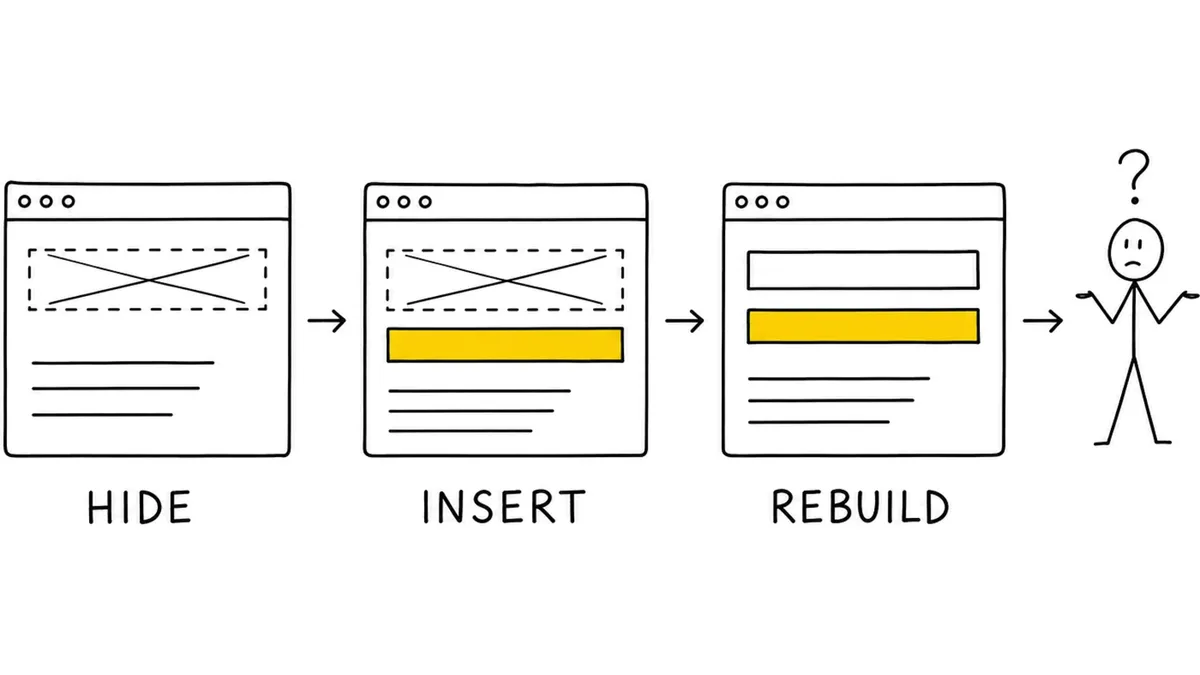
Tailor changes web pages we didn't build. A marketer opens our Chrome extension on their own site, picks a headline, rewrites it for visitors from one ad, and publishes. Our script then runs in the visitor's browser, finds that headline, and swaps it before the page paints. No deploy, no dev queue, no change to their codebase.
That sounds like two lines of jQuery. The swap is. Everything around it isn't.
You can't just save a selector
Store a CSS selector and it breaks. The class is called css-1k9xrto and will be called something else after the next deploy. Nth-child shifts when marketing adds a promo banner. IDs are generated at render time. The page you captured three weeks ago isn't the page you're serving on today.
So we don't store an address. We store a description of the element and go looking at serve time. The matcher that does it is where we've spent the most time, and I'll skip the details. One rule is worth pulling out:
Fail closed
When the match is ambiguous, we apply nothing. A wrong match visibly breaks a customer's page. A missed match just doesn't apply, shows up in our reporting, and gets fixed. Those look similar on a dashboard and cost wildly different amounts, so the matcher can give up but never guess.
Every ambiguous case is an opportunity to be clever. Being clever is how you rewrite the wrong button on somebody's checkout page.
Finding the element is the easy half. On most sites, something is still running.
React is blind to you
React keeps a fiber for every element it renders: type, props, state, and a pointer to the real DOM node. That tree is its source of truth.
React only touches nodes that have a fiber, and it can't see changes made from outside. Every render, it makes the DOM match its own tree. Everything below follows from that.
Three outcomes:
- No fiber. React didn't create the node, so it never touches it. Your change always survives.
- Fiber, component never renders again. React adopts the node at hydration and leaves it. Your change survives.
- Fiber, component re-renders or re-hydrates with a mismatch. React rebuilds from its tree. Your change is gone.
The third one has a worse variant than "the change reverts."
How you get two headlines
Replacing a headline is a hide plus an insert. Hide the original, put the new one beside it.
Now React re-creates the original. Not reuses, re-creates: destroys the node, builds a fresh one from its virtual DOM. Your display-none was on the old node. The new one arrives visible. Your replacement has no fiber, so it's untouched and still sitting there.
Two headlines on a customer's live page.
The tell is node identity, not node count. We tag every element we touch and record which one each replacement stands in for. On a healthy page those cross-check. On a broken one, the replacement points at something no longer in the document, and the visible original wears a fresh tag.
Counting doesn't work, and this catches people. A correct replace also leaves two matching elements. One is hidden. Health checks have to read visibility and the reference chain, never the count.
We applied an identical change to two live sites in one session. Our own marketing site (Vite, plain hydration, static hero): applied, stayed put. A customer on Next.js App Router with server components: duplicate.
We know that duplicate is React rebuilding from its virtual DOM. We don't know whether it's a hydration mismatch or a post-hydration remount, because that hero reads localStorage in an effect and both paths look identical from outside. Same family, same fixes, so we stopped there.
The one question worth asking
Before you touch an element: after the page settles, will React render this component again?
No, you're safe. Yes, expect a fight.
Fights: state updates, effects that set state after mount, timers, context and store subscriptions, conditional mounts, key changes, list reordering, and impure renders calling Date.now or Math.random.
Doesn't: static JSX, and anything CSS-only. Transitions, hover, and keyframes never involve React.
What we changed
Insert, don't replace
An inserted node has no fiber and can't be reconciled away. The hide in hide-and-replace is attached to a node React may rebuild.
Apply after hydration
Every serve-time change waits for window load plus a frame plus a settle, so it can't cause a mismatch. Started as one customer's fix, turned out to be right everywhere.
Re-assert once, not forever
A mutation observer that re-applies on reconcile handles a one-shot rebuild. It loses to continuous re-rendering. You can't outrace a carousel firing twenty-odd mutations a second, and trying burns the visitor's battery. Re-assert for one-shot. For continuous churn, refuse and give the customer a real variant.
Check the framework first
Next App Router with server components and Suspense means higher rebuild risk. A plain hydration root with static content is basically free. Seconds to check, days saved.
The general lesson
You're a guest on someone else's page. You don't own the DOM, you don't control their deploys, and their framework doesn't know you exist.
So you describe instead of address, you give up rather than guess, and you assume anything you change might be changed back a few milliseconds later.

Written by

Greg Bayer
CEO & Co-founder