
Integration · React & Next.js
Test page variants on React and Next.js sites.
React and Next.js give engineering teams full control over the frontend. But that control creates a bottleneck: every landing page experiment requires a code change, a PR, a review, and a deploy. Marketing teams wait weeks to test a new headline.
Tailor works differently. It operates at the DOM layer, after your React app has rendered. One script tag. No npm packages, no component wrappers, no changes to your build pipeline. Marketing can run experiments while engineering focuses on product. Teams that want deeper control can also use the Tailor API.
Last updated March 1, 2026
 Tailor AI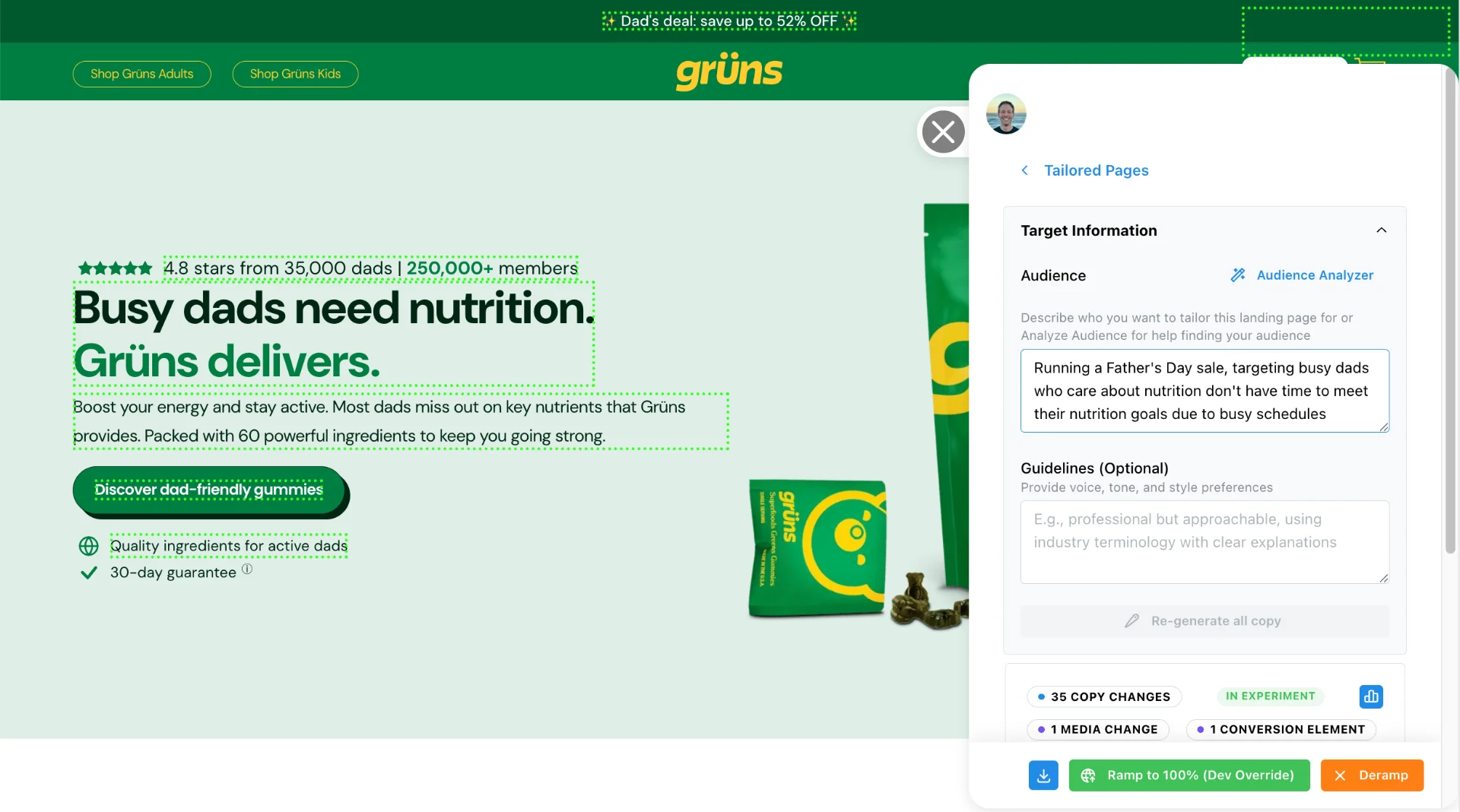
- How it works
- One JavaScript tag in your page head. Tailor loads asynchronously after hydration and adapts page elements in the browser. No React component changes.
- What you get
- A/B testing, keyword matching, audience personalization, and analytics on any page rendered by React or Next.js.
Teams running Tailor






The problem
Why React and Next.js teams struggle with landing page experiments
React apps are component-driven. Changing a headline means editing a component, updating props or content, running tests, creating a pull request, getting it reviewed, and deploying. For a marketing experiment, that process is disproportionately heavy.
One growth lead put it this way: “All we want to do is test a new hero image on the homepage. And why is this such a huge lift?”
The core tension: engineering teams build React apps for maintainability and control. Marketing teams need to iterate on copy and creative quickly. These goals collide when every experiment enters the sprint cycle.
Component-level A/B testing libraries exist, but they still require code changes for every new variant. Feature flag systems help with rollouts, but they are not designed for rapid creative experimentation. Neither approach gives marketing teams independence.
"You don’t want to be dependent on your product and eng team on stuff like this. It slows you way down."
Architecture
How Tailor works with React and Next.js
Tailor works at the JavaScript DOM layer, not the React component layer. This is a deliberate architectural choice. It means Tailor is platform-agnostic. It works the same way whether your frontend is React, Next.js, Vue, or a custom PHP/React hybrid stack.
Here is the technical sequence:
- 1
Add the script tag
Paste Tailor's one-line JavaScript snippet into your document head. In Next.js, this goes in _document.tsx, app/layout.tsx, or your custom Head component. In Create React App or Vite, add it to index.html.
- 2
Page renders and hydrates normally
Your React app renders on the server (SSR/SSG) or client as usual. Tailor does not interfere with this process. The script loads asynchronously and does not block rendering or hydration.
- 3
Tailor applies changes to the rendered DOM
After the page is interactive, Tailor reads the visitor's context (campaign, keyword, device, geo, enrichment data) and applies the appropriate variant by modifying DOM elements directly.
- 4
MutationObserver handles re-renders
If React re-renders a component and replaces a DOM node, Tailor detects the change and re-applies modifications automatically. For most landing page content, re-renders after initial hydration are infrequent.
- Honest limitation
- Tailor modifies the rendered DOM, not React state. It does not have access to React internals, props, or context. If your app frequently re-renders the elements being tested (for example, a real-time data dashboard), Tailor's changes may flicker or need to re-apply. For static or semi-static landing page content (headlines, images, CTAs, sections), this is not an issue in practice.
Compatibility
SSR and static site compatibility
Next.js supports multiple rendering strategies: server-side rendering (SSR), static site generation (SSG), incremental static regeneration (ISR), and client-side rendering. Tailor is compatible with all of them because it operates after the page has rendered in the browser.
What this means in practice:
- SSR (getServerSideProps / Server Components)
- The server delivers fully rendered HTML. The browser hydrates it. Tailor applies changes after hydration. Search engines see the original server-rendered content.
- SSG (getStaticProps / generateStaticParams)
- Pre-built HTML is served from a CDN. Tailor applies changes in the browser after the static page loads. Your build pipeline is unaffected.
- ISR (Incremental Static Regeneration)
- Pages revalidate on a schedule. Tailor's changes are applied client-side regardless of when the page was last regenerated.
- Client-side rendering (SPA)
- Tailor waits for the React app to mount and render, then applies changes to the resulting DOM.
Install the browser script with your existing rendering setup.
See Tailor on your React or Next.js site
Capabilities
What marketers can test without touching React code
Select page elements in the visual editor to create variants.
- Headlines and subheadlines Match ad copy to page messaging without editing component props or pushing a new build. When a visitor clicks a Google Ads keyword, the headline reflects that keyword automatically.
- Hero images and graphics Swap images by campaign, audience segment, or geo without creating new React components or modifying your Next.js image optimization pipeline.
- CTAs and buttons Change text, color, or destination URL by audience. No component re-renders or state changes needed. Test urgency copy, social proof, or value-prop framing.
- Entire page sections Show industry-specific proof points, testimonials, or case studies based on visitor enrichment data. Works on both server-rendered and client-rendered sections.
- Navigation and layout Remove nav for squeeze page tests. Reorder sections. Show or hide elements without conditional rendering logic in your React components.
- Form fields and microcopy Adjust form labels, placeholder text, or field visibility by traffic source or device type. Works with controlled and uncontrolled form components.
"We just want to swap a headline and measure it. We shouldn’t need a deploy for that."
Performance
Performance and SEO considerations
Technical buyers ask about page speed and SEO impact first. Here are the specifics.
- Page load time
- Tailor loads asynchronously via a single script tag, designed to avoid blocking rendering, parsing, or hydration. DOM changes are applied within 200ms of page load in typical conditions.
- Core Web Vitals
- Tailor is designed to minimize impact on Largest Contentful Paint (LCP) and First Input Delay (FID) because it loads after the critical rendering path. Cumulative Layout Shift (CLS) impact depends on what you change. Swapping a headline's text typically has no CLS impact. Swapping an image with different dimensions can cause CLS if you do not match the original size.
- SEO and search engine visibility
- Your server-rendered HTML stays intact. Tailor modifies the DOM after hydration, so crawlers index your original Next.js output. Googlebot renders pages with JavaScript, but the base page content is what gets indexed. Your canonical tags, meta descriptions, and structured data are not modified by Tailor.
- Content Security Policy (CSP)
- If your site uses a strict CSP, you will need to allowlist Tailor's script domain. This is a one-time configuration change.
For a deeper look at how Tailor handles search engine visibility, see SEO and cloaking. For benchmark data on script loading, see performance and compatibility.
Prerequisites
Before you start
Make sure you have the following before adding Tailor to your React or Next.js site:
- Access to your HTML template or layout file. In Next.js (App Router), this is app/layout.tsx. In Next.js (Pages Router), this is pages/_document.tsx. In Vite or Create React App, this is index.html.
- Alternatively, a tag manager like Google Tag Manager. If you cannot or prefer not to modify your codebase, GTM works as a no-code option for adding the script.
- Your site deployed and accessible at a live URL. Tailor works on the rendered page in the browser, not in a local development server's hot-reload preview.
- Chrome browser for setup. Tailor's visual element selector runs as a Chrome extension on your deployed pages.
- No specific npm packages or build tool changes required. Tailor is a single external script tag, not an npm dependency.
If you use a Content Security Policy (CSP), you will need to add app.tailorhq.ai to your script-src directive. This is a one-time change.
Troubleshooting
Common issues
- Hydration mismatch warnings in the console
- If Tailor modifies DOM elements before React hydration completes, React may log hydration mismatch warnings. Tailor is designed to wait for hydration, but in rare cases with slow networks, the timing can overlap. These warnings are cosmetic and do not affect functionality. If you see them frequently, confirm the Tailor script has the async attribute.
- React strict mode double-rendering in development
- React strict mode (enabled by default in development) intentionally double-renders components to detect side effects. This can cause Tailor to apply and then re-apply changes. This only happens in development mode and does not affect production behavior.
- Client-side navigation (SPA routing) resets changes
- When React Router, Next.js Link, or other client-side routers navigate between pages, the DOM is replaced without a full page reload. Tailor uses a MutationObserver to detect these DOM changes and re-applies experiment variants automatically. If changes are not persisting across routes, check that the Tailor script is in a layout file that persists across routes (not a per-page component).
- Next.js middleware conflicts
- If you use Next.js middleware for redirects, rewrites, or authentication, make sure the middleware is not stripping query parameters (UTMs, campaign IDs) that Tailor uses for targeting. Check your middleware's matcher configuration to ensure marketing landing pages pass through cleanly.
- Content Security Policy blocking the script
- React and Next.js apps deployed to enterprise environments often have strict CSP headers. If Tailor does not load, check the browser console for CSP violation errors and add app.tailorhq.ai to your script-src and connect-src directives.
QA
Verify Tailor is running
After adding the script to your React or Next.js app, follow these steps to confirm the integration is working:
- 1
Deploy your app with the Tailor script tag in the document head.
- 2
Open your deployed site in Chrome (not localhost, unless you are testing locally with the script included).
- 3
Open DevTools (right-click > Inspect, or Cmd+Option+I on Mac).
- 4
Go to the Console tab and type window.__tailor then press Enter. If you see an object (not "undefined"), Tailor is loaded.
- 5
Switch to the Network tab and filter by "tailorhq". You should see a request to app.tailorhq.ai returning a 200 status.
- 6
Check the Console for hydration warnings. A few are normal in development mode with React strict mode. In production, there should be none related to Tailor.
- 7
Navigate between pages using client-side routing (click internal links). Verify that Tailor re-applies changes on each route without a full page reload.
If the script loads but experiments are not applying, check that your element selectors are valid on the deployed version of the page. CSS class names generated by build tools (CSS Modules, styled-components, Tailwind) can differ between development and production builds.
FAQ
Frequently asked questions
Tailor typically requires no changes to your React components or build pipeline. It operates on the rendered DOM after your React or Next.js app has mounted. You add a single script tag to your page head. No npm packages, no component wrappers, no build configuration changes needed in most setups.
Yes. Tailor loads asynchronously in the browser and applies changes to the DOM after hydration. It does not interfere with SSR or SSG output. Search engines see your original server-rendered HTML.
If React re-renders a component and replaces the DOM node, Tailor needs to re-apply its changes to the new node. Tailor uses a MutationObserver to detect DOM changes and automatically re-applies modifications when elements are replaced. For most landing page content (hero sections, CTAs, images), React re-renders are infrequent after initial hydration.
Tailor loads asynchronously to avoid blocking page rendering. It is designed to minimize Lighthouse impact, typically applying DOM changes within 200ms of page load. The script does not modify server-side rendering, and search engines see your original HTML structure.
Yes. Tailor operates at a different layer. React-based testing libraries (like feature flags in your codebase) control component logic during rendering. Tailor modifies the rendered output in the browser. They can coexist, though you should avoid testing the same element with both tools simultaneously to keep results clean.
Start testing on your React site without deploy cycles
Add one script tag, with no npm packages or build changes, and see Tailor running in minutes.