
Integration · WordPress
A/B testing and personalization for WordPress, with no plugin to install
WordPress powers millions of marketing sites, but testing and personalizing those pages is surprisingly difficult. Most teams depend on agencies or developers to make changes, and even small experiments can take weeks. Tailor works on top of your WordPress site with a single line of JavaScript, so you can test headlines, swap images, and personalize CTAs without touching your theme, plugins, or page builder.
Last updated March 1, 2026
 Tailor AI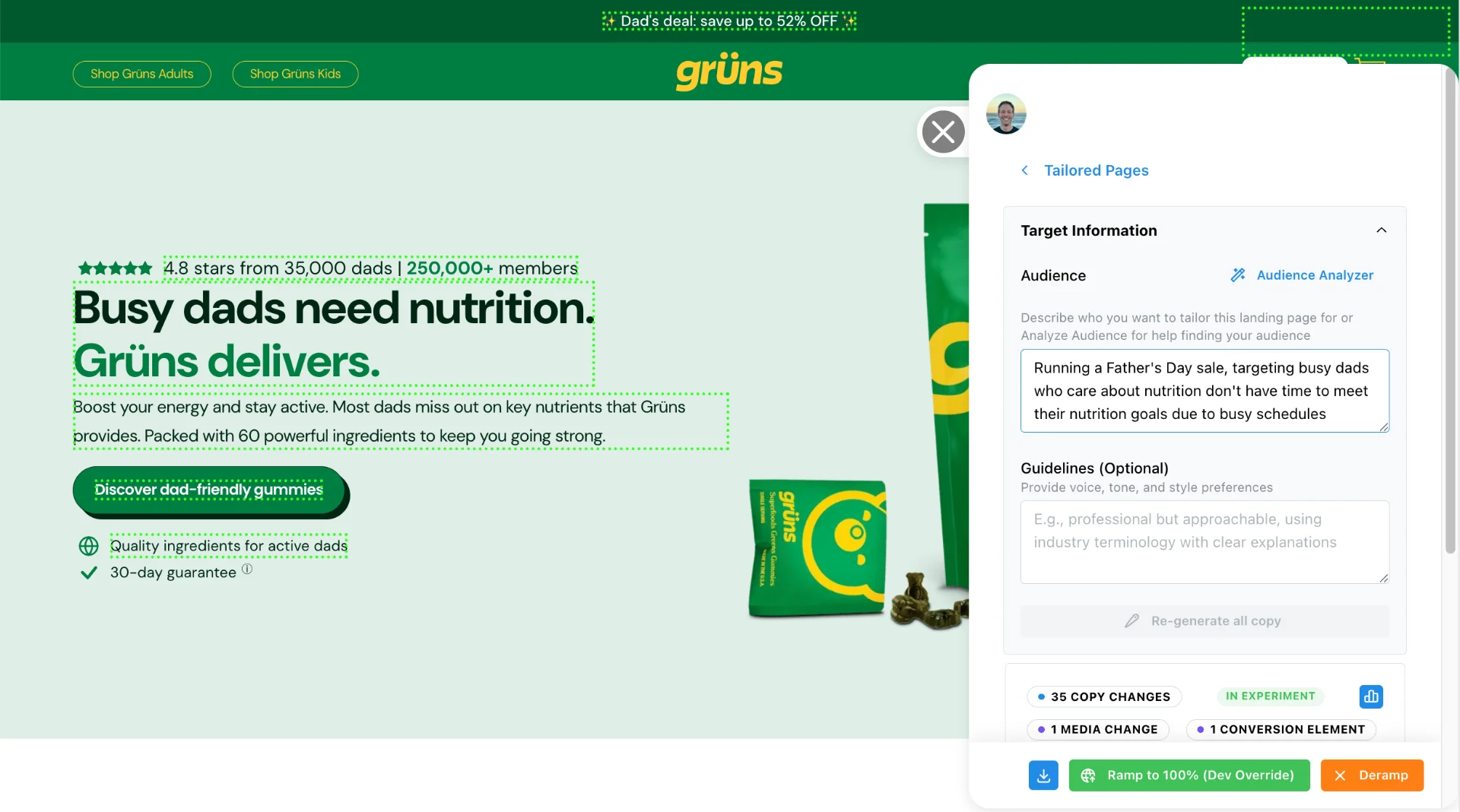
- How it works
- One JavaScript snippet in your WordPress theme header or tag manager. No plugin to install or maintain. Works with most themes and page builders.
- What you get
- A/B testing, keyword-to-page matching, audience personalization, and downstream analytics on any WordPress page.
Teams running Tailor






Context
Why WordPress teams struggle with testing and personalization
WordPress is flexible enough to build almost anything, but that flexibility comes at a cost when it’s time to iterate. Agency-built themes, locked-down page builders, and custom plugins make even simple changes slow and expensive.
We hear the same patterns from growth teams running on WordPress:
- Agency dependency. One team told us their agency had to build a completely different WordPress site just to create another variation. It took weeks and was, in their words, "a headache."
- Expensive page builds. Multiple teams have shared costs of $7,000 for four landing pages, or $45,000-$50,000 for a single agency engagement to build landing pages.
- Slow iteration cycles. A growth lead shared: "I’ve never seen a landing page go live faster than a month." Three-week build cycles are common even for minor changes.
- CMS lock-in. As one marketing leader put it: "Those pages are sitting in a CMS that’s very hard to modify." WordPress sites accumulate complexity over time, and each change risks breaking something else.
Many marketing teams have strong WordPress sites but no practical way to test or personalize them without dev support.
What teams try
How most teams work around WordPress limitations today
- Duplicate the entire site
- Some teams build a separate WordPress instance for each variation. This creates maintenance nightmares and doubles hosting costs.
- Use WordPress A/B testing plugins
- Most WordPress testing plugins add significant page weight, conflict with caching plugins, or require specific theme compatibility. Many haven't been updated in years.
- Build pages in a separate tool
- Teams move landing pages to Unbounce, Instapage, or similar tools. This splits the site across platforms, complicates analytics, and often means different design systems.
- Go back to the agency
- Every change goes through a 2-4 week agency cycle. At agency rates, iterating on 10 variations is simply not feasible.
- Migrate away from WordPress
- Some teams abandon WordPress entirely. One healthcare company we spoke with migrated to a different platform specifically because WordPress made testing too difficult. That is a major undertaking for an incremental gain.
Setup
How Tailor works with WordPress
Tailor is not a WordPress plugin. It works via JavaScript injection, the same way analytics tools like Google Analytics or Hotjar work. One snippet in your theme header (or via Google Tag Manager), and Tailor can adapt any element on any page.
- 1
Add the script to your WordPress site
Paste Tailor's one-line JavaScript snippet into your theme's header (Appearance > Theme Editor > header.php) or add it via Google Tag Manager. No plugin installation needed.
- 2
Select elements to change
Open any published page in Tailor's Chrome extension. Click on the headlines, images, CTAs, or sections you want to test or personalize.
- 3
Set targeting rules and publish
Define who sees each variant: by keyword, campaign, geography, device, or company enrichment. Publish changes instantly. No WordPress deploys, no cache clearing, no staging sites.
Test changes without theme edits, page builder changes or an agency. The script loads asynchronously and is designed to work alongside your WordPress caching and preserve your SEO.
"One line of JavaScript and it works with our existing WordPress setup. No plugin conflicts, no theme issues."
See Tailor on your WordPress site
Capabilities
What you can test and personalize
- Headlines and subheadlines Match ad copy to page messaging across theme templates and custom post types. When the keyword is "enterprise CRM," the headline says "enterprise CRM." No duplicate pages needed.
- Hero images and graphics Swap visuals by campaign, industry, or audience segment without re-uploading to WordPress media library or editing Elementor/Divi layouts.
- CTAs and buttons Change button text, color, or destination URL based on visitor intent. Works with page builder buttons, theme CTAs, and WooCommerce product page actions.
- Page sections Show or hide content blocks built in any page builder. Display industry-specific testimonials on service pages or swap pricing sections for different audiences.
- Navigation and menus Run squeeze page tests by hiding your WordPress menu without editing your theme's header template. Measure conversion impact without permanent layout changes.
- Forms and lead capture Personalize form headlines, pre-fill fields, or change the submit button CTA on Gravity Forms, WPForms, or Contact Form 7 based on traffic source.
All without logging into WordPress admin, editing your theme, or contacting your agency. Watch how it works.
One real estate marketplace runs WordPress-based guides with conversion rates below 1%. With Tailor, they can test headline and CTA variations on those existing pages without rebuilding them.
Implementation
Getting started
Adding Tailor to a WordPress site takes less than five minutes. There are two common approaches:
- Option 1: Theme header (recommended)
- Go to Appearance > Theme Editor > header.php (or your theme's header template). Paste Tailor's script tag before the closing </head> tag. Save. Done.
- Option 2: Google Tag Manager
- If you already use GTM, add Tailor's script as a Custom HTML tag that fires on All Pages. This avoids touching your WordPress theme entirely.
If you’re using GTM, watch the GTM installation walkthrough.
Both approaches work with caching plugins (WP Rocket, W3 Total Cache, etc.) since Tailor loads asynchronously and does not interfere with server-side caching.
After adding the script, install the Tailor Chrome extension and start selecting elements to test on any published page.
Prerequisites
Before you start
Make sure you have the following before adding Tailor to your WordPress site:
- WordPress admin access. You need to edit your theme header file or install a header/footer plugin.
- Ability to add scripts to the <head> tag. This is done either through Appearance > Theme Editor > header.php, a plugin like Insert Headers and Footers (WPCode), or Google Tag Manager.
- Your WordPress site live and accessible. Tailor works on the published site, not in WordPress preview or draft mode.
- Chrome browser for setup. Tailor's visual element selector runs as a Chrome extension on your live pages.
If you cannot edit your theme directly (common with agency-built sites), the Insert Headers and Footers plugin or GTM approach avoids touching theme files entirely.
Troubleshooting
Common issues
- Caching plugin serving stale pages
- WP Rocket, W3 Total Cache, LiteSpeed Cache, and similar plugins can serve cached HTML that does not include your newly added script. After adding Tailor, clear your WordPress cache (Settings > Cache Plugin > Purge All). Tailor loads asynchronously, so it does not conflict with page caching once the script tag is present in the HTML.
- Script placed in footer instead of header
- Some header/footer plugins default to inserting code in the footer. Tailor's script should go in the <head> tag to load as early as possible. If placed in the footer, the script still works but page elements may briefly flash with original content before Tailor changes apply.
- Page builder compatibility (Elementor, Divi, WPBakery)
- Tailor works at the DOM level after the page renders, so it is compatible with all major page builders. However, some builders generate deeply nested markup with dynamic class names. If a CSS selector breaks after a page builder update, re-select the element in Tailor's Chrome extension.
- Theme updates overwriting header changes
- If you added the Tailor script directly to header.php, a theme update may overwrite your changes. Use a child theme or the Insert Headers and Footers plugin to avoid this. GTM is another option that survives theme updates.
- Security plugins blocking external scripts
- Plugins like Wordfence, Sucuri, or iThemes Security can block external JavaScript. If Tailor does not load, check your security plugin's firewall or script-blocking settings and allowlist app.tailorhq.ai.
QA
Verify Tailor is running
After adding the script to your WordPress site, follow these steps to confirm the integration is working:
- 1
Open your live WordPress site in Chrome (not WordPress admin or preview mode).
- 2
Clear your WordPress cache if you use a caching plugin. This ensures the page HTML includes the Tailor script.
- 3
Open DevTools (right-click > Inspect, or Cmd+Option+I on Mac).
- 4
Go to the Console tab and type window.__tailor then press Enter. If you see an object (not "undefined"), Tailor is loaded.
- 5
Switch to the Network tab and filter by "tailorhq". You should see a request to app.tailorhq.ai returning a 200 status.
- 6
Right-click > View Page Source and search for "tailorhq" to confirm the script tag is present in the HTML. If it is missing, your cache may still be serving the old version.
WordPress caching is the most common cause of the script not appearing. If View Page Source does not show the tag, purge all caches and check again.
FAQ
Frequently asked questions
No. Tailor works via a single JavaScript snippet you add to your theme or tag manager. There is no WordPress plugin to install, update, or maintain.
Yes. Tailor operates at the DOM level in the browser. It works with most WordPress themes, page builders (Elementor, Divi, WPBakery), and custom themes that support JavaScript.
Tailor loads asynchronously to avoid blocking page rendering. It is designed to minimize performance impact on WordPress sites.
Yes. That is one of the most common use cases. Tailor lets you test and personalize agency-built pages without going back to the agency for changes.
Your original WordPress pages remain unchanged. Tailor applies changes in the browser. If you remove the script, visitors see your original pages exactly as they were.
Start testing on your WordPress site today
Add one line of JavaScript, with no WordPress plugins or dev queue, and see Tailor running in minutes.