
Guide · Ad-to-Page Optimization
Ad-to-Page Playbook: Match Every Ad to Its Landing Page
The gap between what your ad promises and what your landing page delivers is the single most common source of wasted ad spend. Most teams run dozens or hundreds of ad variants but send all traffic to a handful of generic pages. This playbook shows you how to close that gap across Google Ads, Meta, and LinkedIn.
By Tailor AI team · Last updated March 1, 2026
 Tailor AI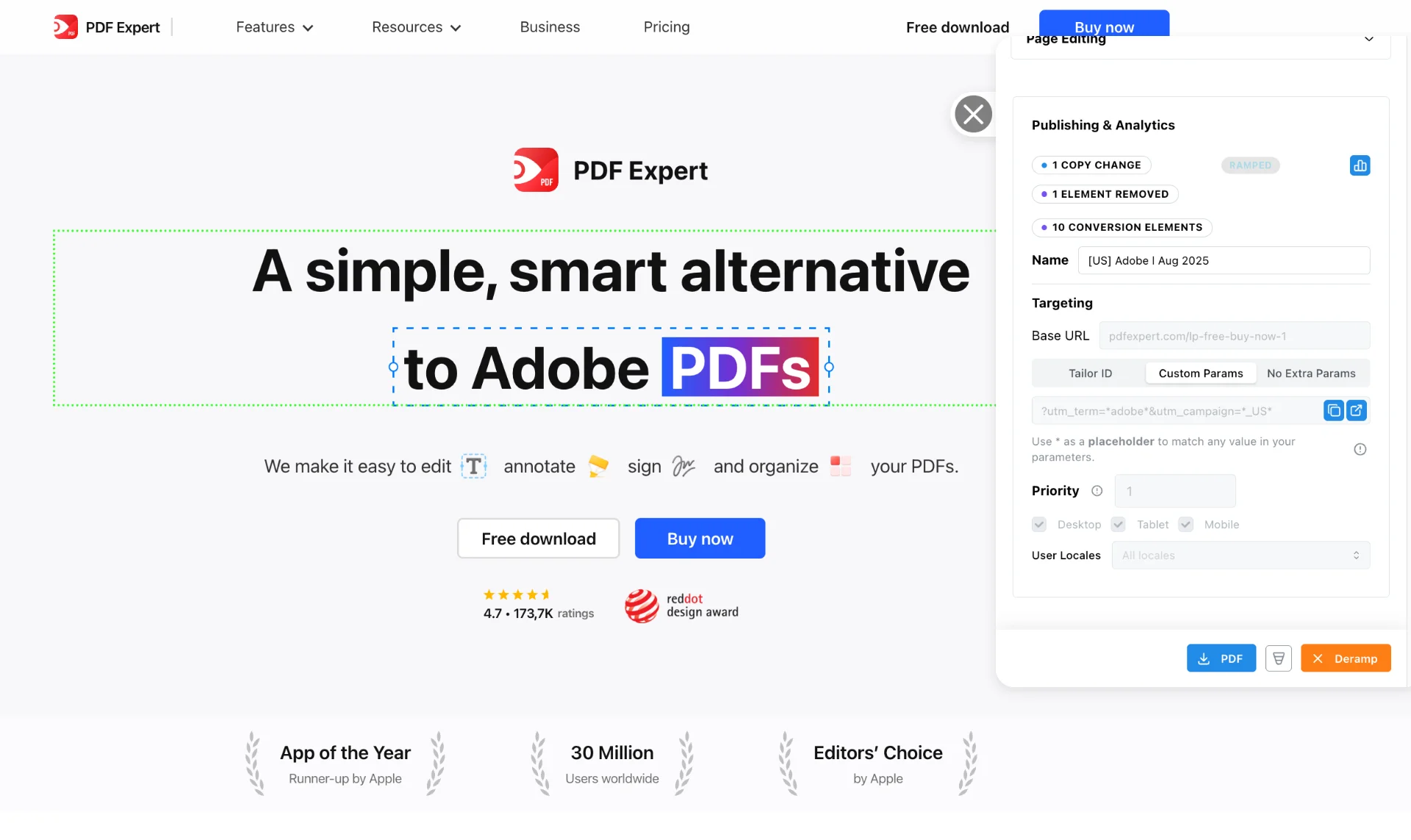
Screenshot from the PDF Expert case study
- Who this is for
- Performance marketers, growth teams, and agencies running paid campaigns who know their landing pages aren't matching their ad messaging.
- Methodology
- The ad-to-page gap is the most common missed opportunity in paid acquisition. This guide covers the patterns and fixes we've seen work across hundreds of campaign reviews.
Teams running Tailor






The problem
The ad-to-page gap
In hundreds of conversations with paid acquisition teams, one pattern came up more than any other: teams run dozens or hundreds of ad variants, all pointing to a small number of generic landing pages.
"We have a thousand ads and only seven landing pages."
"40 to 50 ads live at any point in time, and maybe four landing pages, but they're very similar."
"It's crazy that they have 12 ads but one landing page."

This isn’t a niche problem. We heard variations of it from nearly every team we spoke with, across SaaS, e-commerce, healthcare, and financial services.
"These performance marketing teams are so focused on CTR and ad creative, then landing pages are glazed over."
“The ad experience, or what the ad looks like compared to visually the landing page, it’s just not super cohesive. That will move the needle more than just changing copy.”
Why does the gap exist?
Three reasons keep showing up. First, building pages is slow. Teams described 2-4 week cycles just to get a landing page variant live. Second, performance marketers are incentivized to optimize ad creative (CTR, cost per click) and the landing page experience falls outside their direct control. Third, nobody owns the landing page experience end-to-end. Marketing owns the messaging, engineering owns the site, and design owns the templates. Getting all three aligned for one test takes more coordination than most teams can afford.
"90% of the marketers we talked to were just not doing it, that they were just ignoring that opportunity."
A mismatch between the ad and landing page can increase abandonment and acquisition cost.
The approach
Signal, adaptation, measurement
Every ad click carries context. The playbook for using that context follows three steps.
- 1. Signal
- Every ad click carries context. Google Ads passes keyword intent, match type, and ad group. Meta passes campaign, ad set, and creative theme. LinkedIn passes company and role targeting. These signals are available via UTM parameters, referrer data, or platform-specific APIs. Most teams already have them. They just aren't using them on the landing page.
- 2. Adaptation
- Use those signals to adapt the landing page. Change the headline to match the keyword. Swap the hero image to match the ad creative. Show relevant proof points for the audience. The goal is to continue the conversation the ad started, not to rebuild the page from scratch. Even small changes (a matched headline, a relevant case study) can meaningfully reduce bounce rates.
- 3. Measurement
- Run per-signal experiments to prove what works. Don't just measure overall conversion rate. Measure per-keyword, per-campaign, per-audience. Tie results to downstream outcomes like trial starts, demo requests, pipeline, and revenue. Results vary by traffic volume, audience, and vertical, so measure your own data rather than relying on benchmarks.
Test whether matching the page to the ad improves conversion.
Channel playbook
Google Ads: keyword intent matching
Google Ads is the clearest use case for ad-to-page matching because the intent signal is explicit: the keyword tells you what the visitor is looking for.
- 1
Audit your current state
How many keywords point to how many pages? If you have 200 keywords and 3 landing pages, that's your gap. Map the ratio.
- 2
Cluster keywords by intent
Group keywords into intent categories: branded, competitor, category, feature-specific, and problem-aware. Each cluster should get a distinct page experience.
- 3
Start with your top 5-10 highest-spend keywords
Build hand-crafted adaptations for these. Match the headline to the keyword. Show relevant proof points. This is where you'll see the fastest impact.
- 4
Use dynamic text replacement for the long tail
For lower-volume keywords, dynamic text replacement lets you insert the keyword or a close variant into the headline automatically. It's not as high-quality as hand-crafted copy, but it's far better than a generic page.
- 5
Test keyword-specific headlines against your generic page
Run an A/B test: adapted page vs. generic page for each keyword cluster. Measure conversion rate, not just clicks.
- 6
Measure per-keyword conversion rate and downstream outcomes
Don't stop at page conversion. Track trial starts, demo requests, or pipeline per keyword. This is how you prove ROI to your team.
For a walkthrough of how dynamic text replacement works in practice, see the dynamic text replacement video. To set up targeting rules by keyword or campaign, see the targeting guide.
Why this matters for Quality Score. Google rewards page relevance at the topic level. When your landing page matches the keyword intent, Quality Score can improve, which lowers your CPC. Matching keyword intent is one of the few ways to reduce cost per click without reducing bids.
"If the user is searching for editor, we are showing the content connected to editing, if it's annotating, annotating."
For a detailed walkthrough of Google Ads landing page optimization, see the dedicated use case page.
Channel playbook
Meta Ads: creative-to-page matching
Meta is different from Google. There’s no keyword intent signal. Instead, you’re working with campaign themes, audience segments, and ad creative. The matching problem is less about search intent and more about visual and message continuity.
- 1
Cluster by creative theme and audience
Group your ads by the message they communicate (feature, pain point, testimonial, offer) and the audience they target (prospecting vs. retargeting, demographic segments).
- 2
Map campaign or ad set names to page adaptations via UTM parameters
Use UTM campaign and UTM content parameters to identify which ad creative the visitor saw. Route those signals to the landing page.
- 3
Match the page visual to the ad creative
If your ad shows a specific image, color palette, or visual style, the landing page should continue that visual language. Discontinuity between ad and page increases bounce rates.
- 4
Address different funnel stages
Prospecting traffic and retargeting traffic need different messaging. A first-time visitor needs education. A retargeting visitor needs a reason to come back and convert.
- 5
Test creative-to-page match vs. generic page
Run a split test: matched experience vs. your current generic page. Measure per-campaign, not just overall.
- 6
Measure ROAS for each campaign.
A page might convert well but attract low-value leads. Tie your measurement to downstream revenue or pipeline, not just form fills.
Meta traffic is mostly mobile. Some teams report 99% mobile traffic from Meta campaigns. Design your adapted pages mobile-first. Heavy desktop layouts that aren’t tested on mobile will underperform.
"We have 20 to 30 ads constantly swapping creative, all pointing to the same generic page."
For a detailed walkthrough of Meta Ads landing page optimization, see the dedicated use case page.
Get a free ad-to-page audit
We scan your live ads, show how many lack a matching page, and estimate the opportunity cost. No install required. Or read the Google Ads use case.
Prioritization
What to test first
You don’t need to match everything at once. Here’s the order that consistently produces the fastest learnings, based on what we’ve seen across teams.
- 1. Headline match
- Adapt the h1 to match the ad's primary message. This is the fastest test with the highest signal. It's also the simplest to implement: one line of text, one experiment.
- 2. Hero image match
- If your ads show different visuals for different audiences, match them on the page. Visual continuity between ad and page reduces the "where am I?" moment that causes bounces.
- 3. CTA relevance
- Change CTA text to match the searcher's intent. "Start free trial" vs. "See pricing" vs. "Get a demo" all signal different commitment levels. Match the CTA to where the visitor is in the funnel.
- 4. Proof points
- Show case studies or social proof relevant to the visitor's industry or use case. A fintech company seeing a fintech case study is more compelling than a generic testimonial.
- 5. Squeeze page test
- Remove navigation to focus on a single conversion action. This consistently shows strong results for paid traffic. Visitors who arrive from an ad already have context. Removing distractions keeps them on task.
"10% difference is going to make a huge difference for us."
"This is a huge paid ads unlock."
The key is velocity. Don’t agonize over finding the perfect test. Run a good-enough test this week, learn from it, and iterate. Over time, the compounding effect of consistent testing outperforms any single “perfect” experiment.
For headline and copy tests, see Smart Copy Tailoring. For image tests, see Image Tailoring.
Proving it works
Measurement: how to prove ad-to-page matching works
The most common reason teams don’t invest in landing page optimization is that they can’t prove it matters. Here’s how to change that.
"Nobody really cares about landing pages because they can't prove the mid-funnel matters."
- Break it down by signal
- Don't rely on overall conversion rate. Break results down by keyword, campaign, or audience. A 5% lift overall might hide a 30% lift on your top keyword and flat results everywhere else. Per-signal measurement tells you where to double down and where to stop spending time.
- Tie experiments to downstream outcomes
- Page conversion rate is the starting point, not the finish line. Track trial starts, demo requests, pipeline, and revenue. A page variant that converts 20% more visitors but produces lower-quality leads is a net negative. Results vary by business model and sales cycle, so connect the full funnel before declaring winners.
- Put results where teams already look
- Experiment results need to show up in the tools your team already uses. If your team lives in GA4, the data should be in GA4. If the CMO reviews Amplitude dashboards, the lift should appear there.
- Start with a simple A/B test
- Pick one keyword or one campaign. Run the adapted page against your generic page. Wait for at least 50 CTA clicks before drawing conclusions. This is your proof-of-concept. If it works, expand to more signals. If it doesn't, iterate on the adaptation before giving up on the approach.
"It needs to be shown wherever they're currently looking. Not in us. They're gonna screenshot that shit and send it in presentations at the end of the quarter."
For GA4 integration details, see the GA4 integration page. For experiment setup, see A/B Testing & Analytics. To configure the conversion events you want to track, see conversion goals setup.
FAQ
Frequently asked questions
None. Tailor adapts your existing page based on who's visiting. One base page can serve dozens of ad variants by changing headlines, images, and CTAs dynamically.
Pick your highest-spend Google Ads keyword or Meta campaign. Build one adapted headline and run it against your generic page. You'll have results within a week if you have enough traffic.
No. Tailor sits on top of your existing pages (Webflow, WordPress, React, or whatever you use). It adapts what's already there rather than building from scratch.
Start with a few high-traffic keywords or campaigns. For lower-traffic pages, use directional testing (shorter test windows, Bayesian methods) rather than waiting for classical statistical significance.
Start with your top 5-10 highest-spend signals. Hand-craft those adaptations. Use dynamic text replacement for the long tail. You don't need a unique page for every keyword.
The headline. It's the first thing visitors see and the most direct connection to what they searched for or clicked on. Start there.
Make each landing page match the intent your ads already create
See how Tailor matches ad messaging to landing pages, on your own site.